
Get the work done. Keep the keys.
Give Bob enough access to finish the job without giving up control of the company. Here is what he can see, where he runs, and what still waits for you.
Last updated: 7 July 2026
Approval gates, default-on
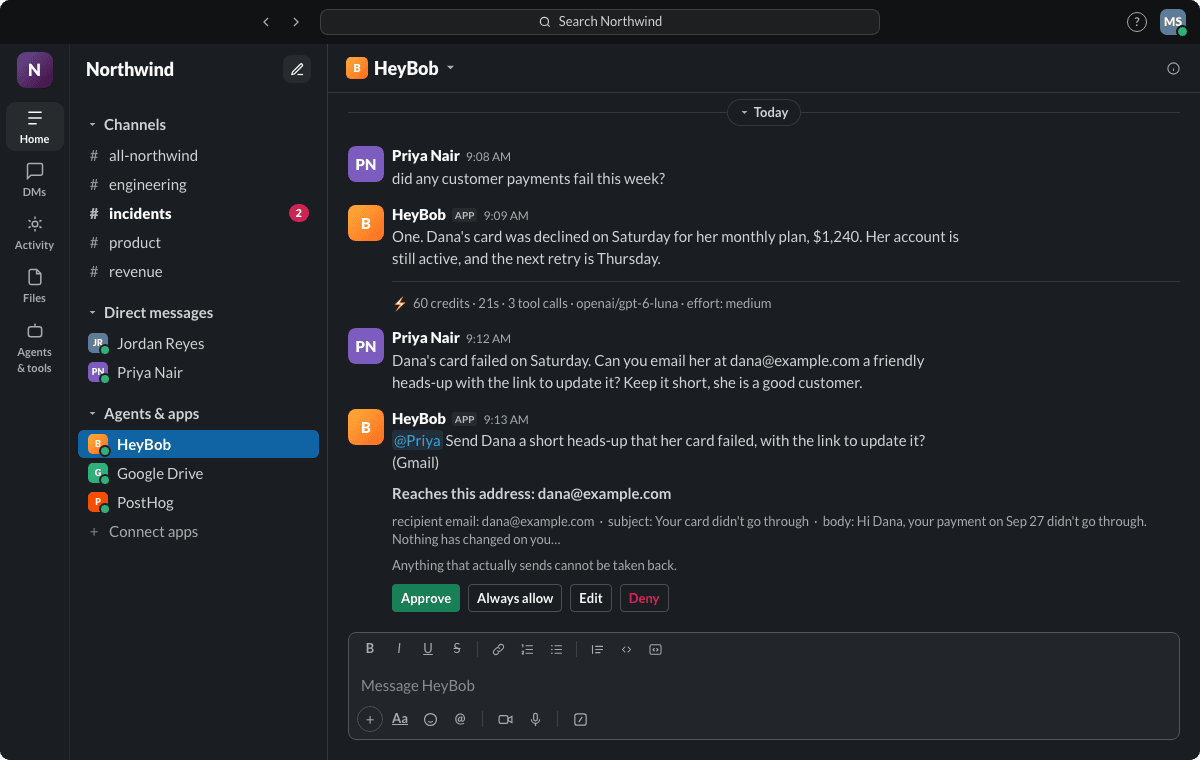
Writes to systems of record (your CRM, your books, your docs) pause for a visible Approve/Deny button before they happen, by default. You can loosen or tighten what's automatic per tool and per action, but the default is a human in the loop, not an opt-in.
What Bob can actually access in Slack
These are the exact bot permissions Slack grants on install, pulled straight from the install code, not a marketing summary.
| Scope | Why Bob needs it |
|---|---|
| app_mentions:read | See when someone @mentions Bob so he knows there's a job to do. |
| chat:write | Post Bob's replies, results, and receipts back into the channel. |
| chat:write.public | Reply in a public channel even before Bob's been explicitly added to it. |
| files:write | Attach the files, spreadsheets, or reports a task produces. |
| files:read | Read files you share with Bob so he can work from them. |
| channels:history | Read message history in public channels Bob's in, for context on a task. |
| channels:read | See the list and names of public channels, so Bob knows where he's been added. |
| channels:join | Join the public channels you pick for him when he first arrives. |
| groups:history | Read message history in private channels Bob's been added to. |
| groups:read | See the names of private channels Bob's been added to. |
| im:history | Read prior direct-message context in a conversation with Bob. |
| im:read | See your list of DM conversations with Bob. |
| im:write | Start a direct message: onboarding notes, an approval prompt, a heads-up. |
| users:read | See workspace member names, so Bob can tell who asked and who approved. |
| users:read.email | Find a teammate by their work email when a task names them that way. |
| commands | Respond to Bob's slash command, if you use it. |
| reactions:write | Add an eyes emoji to your message, so you know he has picked it up. |
Bob only reads messages directed at him, an @mention or a DM, never your team's wider channel traffic beyond what these scopes allow.
How he's kept in check
Sandboxed execution
Every run gets its own isolated, disposable computer in the cloud, spun up fresh for that task and torn down after. Credentials for the tools you connect (your CRM, your ledger, your drive) are encrypted at rest and never enter that sandbox, so a compromised or misbehaving run has nothing to steal.
Spend caps
Workspaces can set a hard monthly spend cap. You get a warning at 80% of it, and nothing runs silently past the ceiling.
No-training commitment
We do not use your data, prompts, or connected-tool content to train external AI models, and we don't sell your data. Full detail in the Privacy Policy.
Receipts and run history
Every completed run posts a compact receipt with total credits, duration, and tool-call count. Approval decisions stay visible beside the work, and the workspace keeps the underlying run history.
An example receipt. Ask Bob “what ran this week” and he adds them up for you.
More detail, if you want it
Own model key & VPC deployment
Bring your own model API key and your token bill goes straight to your provider at your negotiated rate. We never see it, so there's nothing for us to mark up. Bob is a managed service; there is no self-hosted or in-your-own-cloud option today.
Subprocessors
We maintain a current, named list of the subprocessors we rely on to run the product, what each does and the data it may process, and provide it to customers on request and as part of your data processing addendum. See the Privacy Policy for how your data is handled.
Compliance, honestly
We'd rather publish an accurate “in progress” than an overstated badge. This table reflects where things actually stand today.
| Item | Status |
|---|---|
| Encryption in transit | TLS everywhere |
| Encryption at rest | Yes, including the OAuth vault |
| Access to production systems | Restricted and logged |
| Training on customer data | Never |
| Console sign-in | Slack OpenID Connect, no separate password |
| Microsoft Entra ID sign-in | Not yet available |
| SOC 2 Type 1 | In progress, no target date yet |
Questions about anything on this page: [email protected].
Give him access. Keep the controls.
Install Bob, watch the first receipt come in, and see for yourself what he can and can't touch.