
Bob does the work that wastes your day.
The reports, the updates, the copying between apps. Bob, your AI employee in Slack, does it inside your real tools. Nothing changes without your OK, you see what every job cost, and he stops at the monthly limit you set.
$100 of work, on us.No credit card. No sales call. 14 days to spend it.
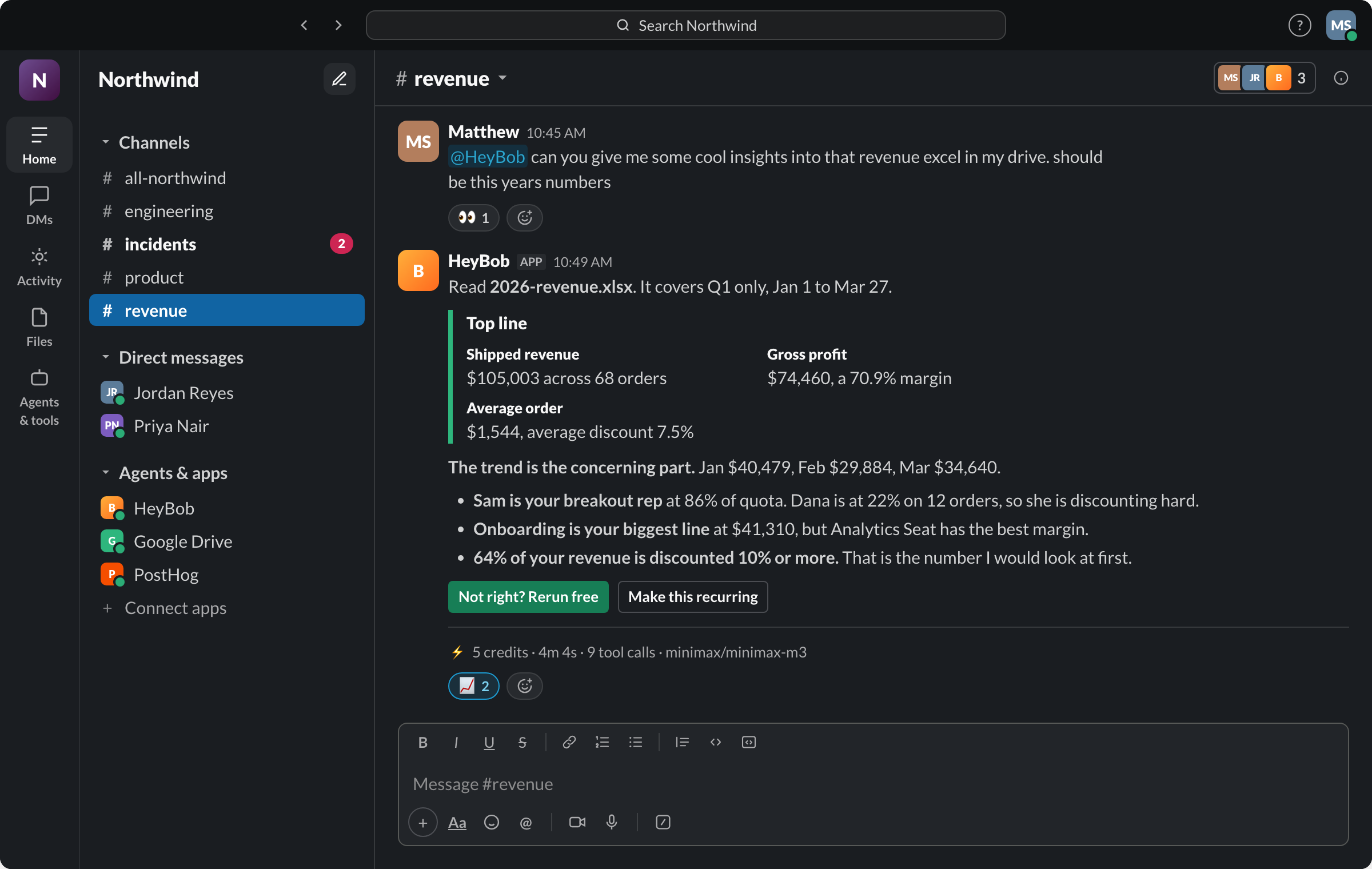
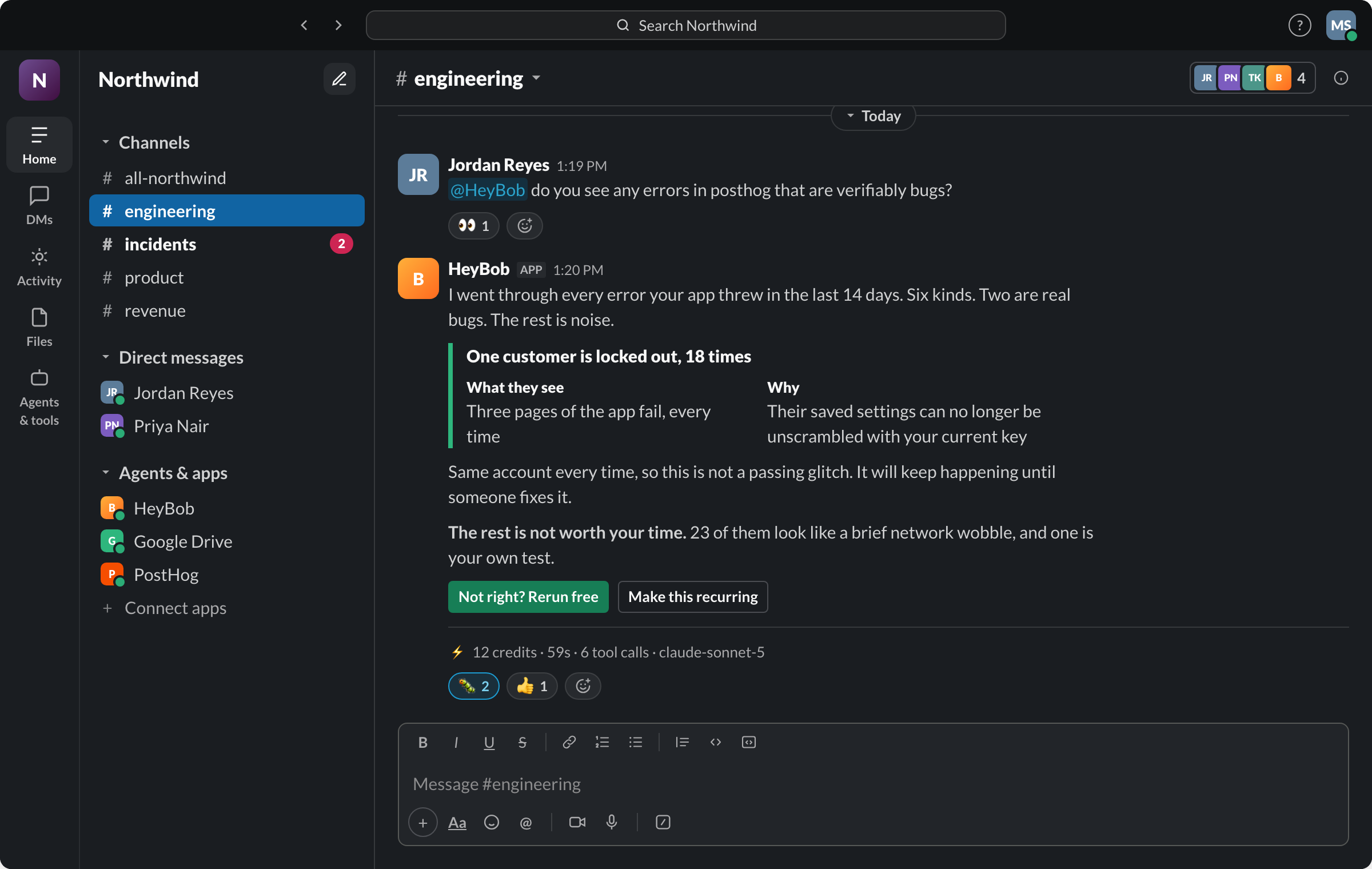
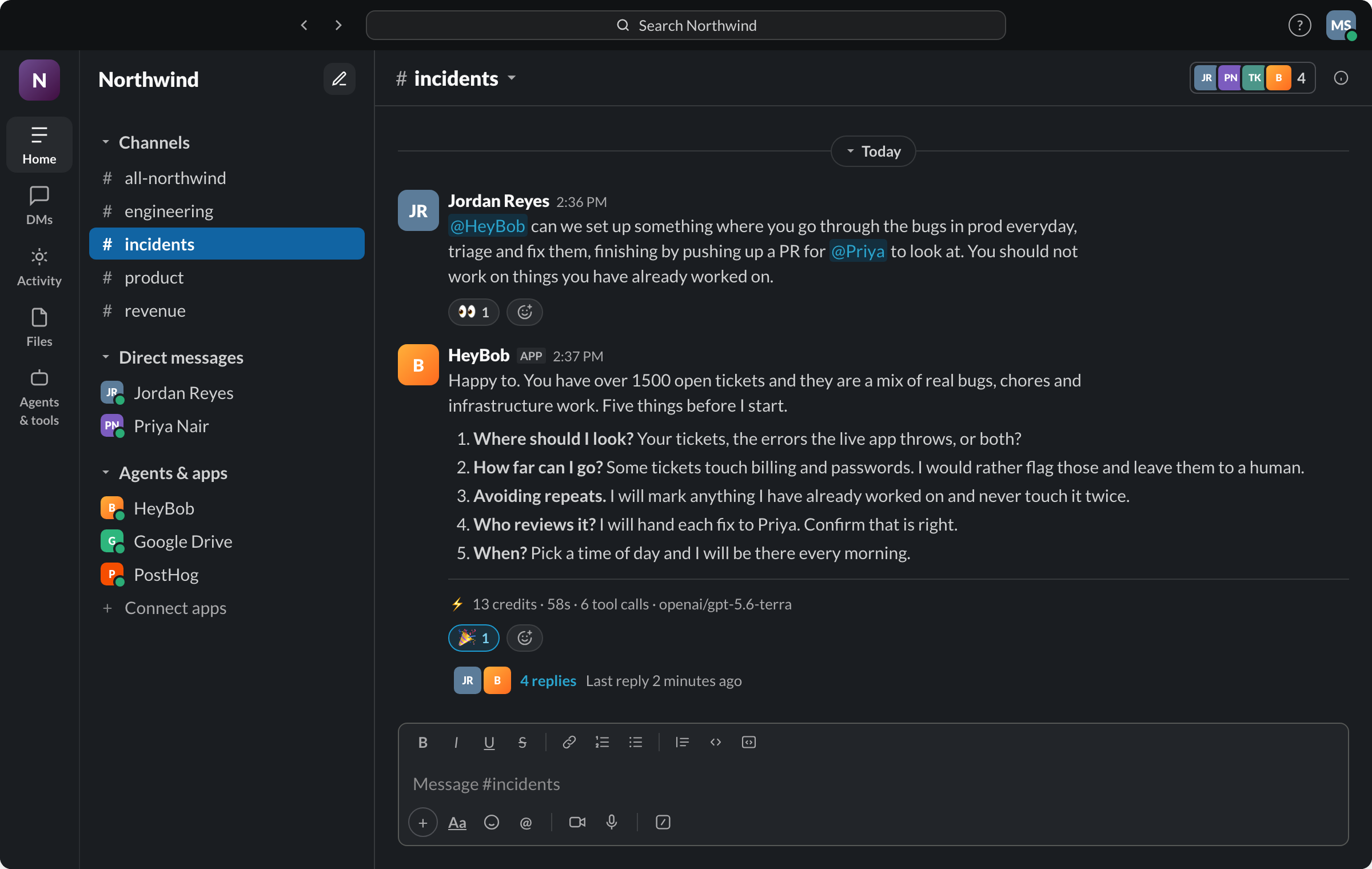
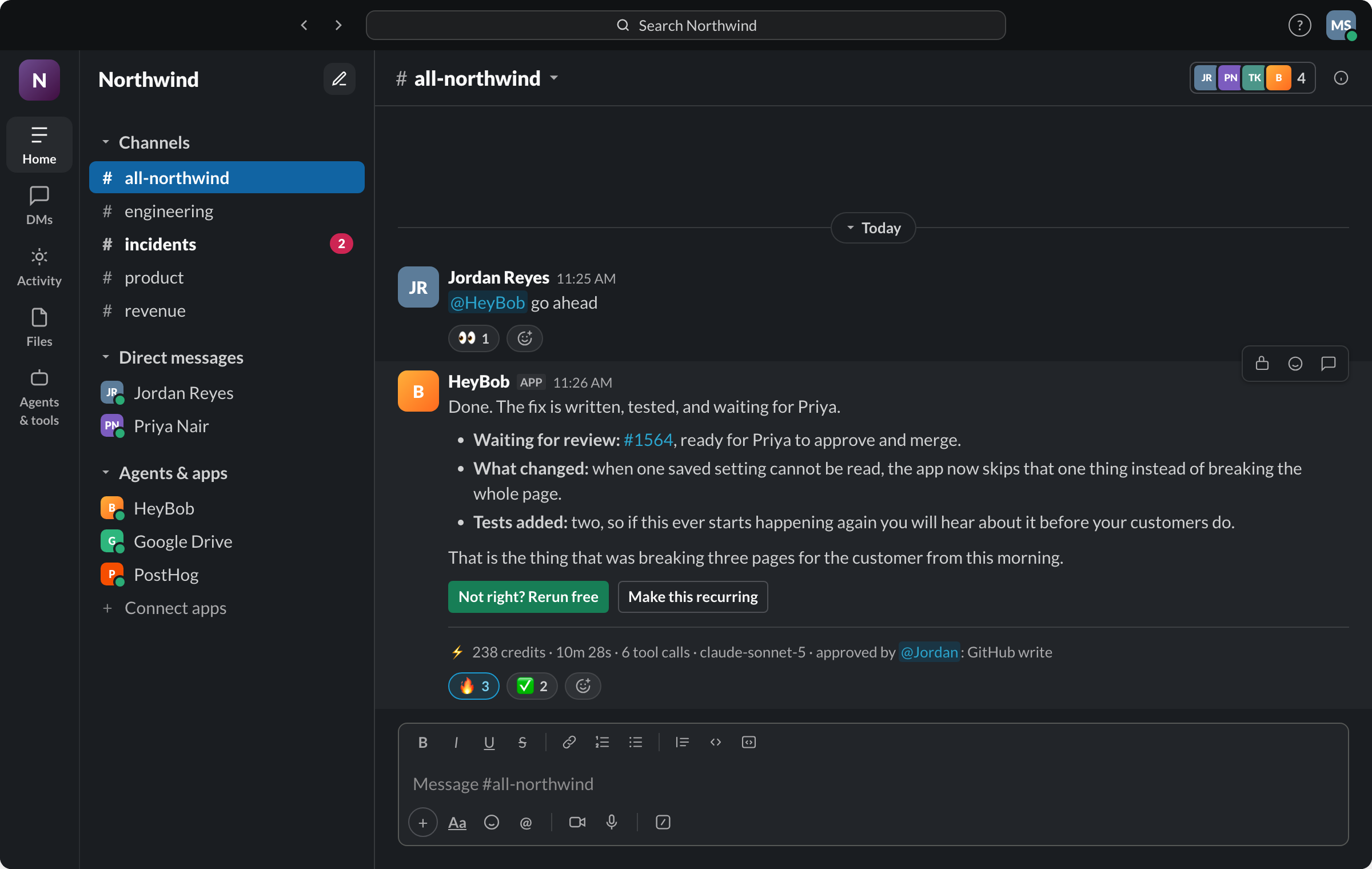
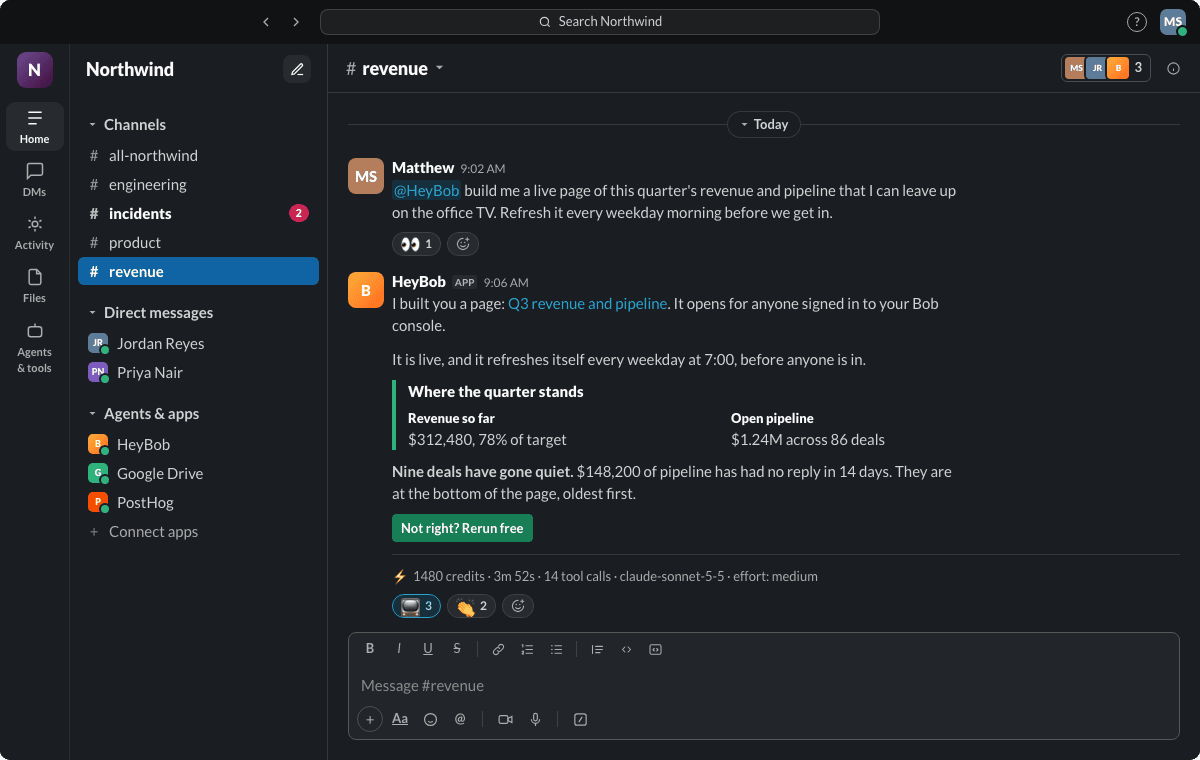
On Auto, Bob picks the right AI for each job. Every receipt names the one that ran.
He already knows your stack.


You do not wire anything up. You ask him to connect one, he sends the login link in the thread, and from then on it is his to use. See every app he can use.
The meeting ends. The tracker is already updated.
One of our customers gave Bob a standing job: nobody on the team writes up meeting notes or files follow-ups anymore.
 Google Calendar
The meeting wraps up
Bob keeps track of the team's meetings and knows when each one ends.
 Fireflies
He reads the transcript
He pulls what was said and picks out who promised to do what.
Jira
Tasks filed, owners assigned
Each task goes to the person who said they would do it.
Email
Follow-ups sent
Everyone gets an email with the updated tasks and who owns each one.
The work you keep pushing to tomorrow.
Pick the one that sounds like you.
"What did we close last week, and what slipped?"
He reads the CRM and the revenue sheet, then posts a three-line summary before you open Slack.
"Pull the quarter's numbers into the investor update."
He fills in the numbers from your spreadsheet and flags anything that changed a lot.
"Which customers haven't logged in this month?"
He checks your app's data and lists who to call, most at risk first.
"Reconcile Stripe payouts against QuickBooks."
He matches every line and brings you only the ones that don't match.
"Anything in the support inbox older than a day?"
He posts the overdue tickets with who owns each one.
"Add new vendors to the tracker and tell #ops."
He fills in the row and posts one line in the channel.
"Update the deal and draft the follow-up."
He updates the CRM, drafts the email, and waits for your OK before sending.
"Which deals haven't moved in two weeks?"
He lists them with the last thing that happened on each.
"Tell me about this company in five bullets."
He checks the web and your CRM history and posts a short brief.
"Build the weekly report from their analytics."
One report per client, posted in their channel, same format every time.
"Turn this doc into tasks in Asana."
He creates the tasks with owners and due dates, then links them in the thread.
"Who is over their retainer hours?"
He checks the time tracker and flags clients over budget.
What he hands you back.
A live page, not a pasted table
Ask for a revenue board once. You get a link that updates itself every morning. Share it with the team. Nobody rebuilds it.
Decks and spreadsheets, done
He builds the slides or the spreadsheet and drops the file in the thread, ready to send.
He remembers how you like it
Tell him once that reports go out Monday and totals come first. He remembers, for you and for the team. Get something wrong? Correct him and it sticks.

Good. Keep it for thinking. Hire Bob for doing.
ChatGPT and Claude are brilliant. Keep them. Bob is something else: one teammate your whole team hands work to in Slack. He works as each person who asks, not through a shared login, asks before anything goes out, and shows what each job cost. Here's the same Monday both ways.
- Remember the weekly numbers are due.
- Log into the CRM. Export the pipeline.
- Open the revenue sheet. Copy last week's tab.
- Paste both into ChatGPT. Ask for a summary.
- "Can you redo it with last week's format?"
- Copy it into Slack. Fix the formatting.
- Update three stale deals in the CRM by hand.
- Do all of it again.
- Your laptop's shut. He's pulling numbers from the CRM and the revenue sheet.
- The summary is already in #revenue, in last week's format, because he remembers it.
- "Three deals look stale. Update them?" Approve
- You tap Approve over coffee. Done.
- Your sales lead asks a follow-up in the same thread. He answers. You didn't have to forward anything.
- Same thing. You never set a reminder.
One teammate the whole team hands work to
Anyone in the channel can give him a job, add to it, or approve it, and everyone sees the same thread. There's nothing to build or set up first. You just ask.
He works as you, not as a shared login
When you ask about your pipeline, he uses your CRM access and your inbox, not one company account that everyone in the channel can use.
Nothing goes out without your OK
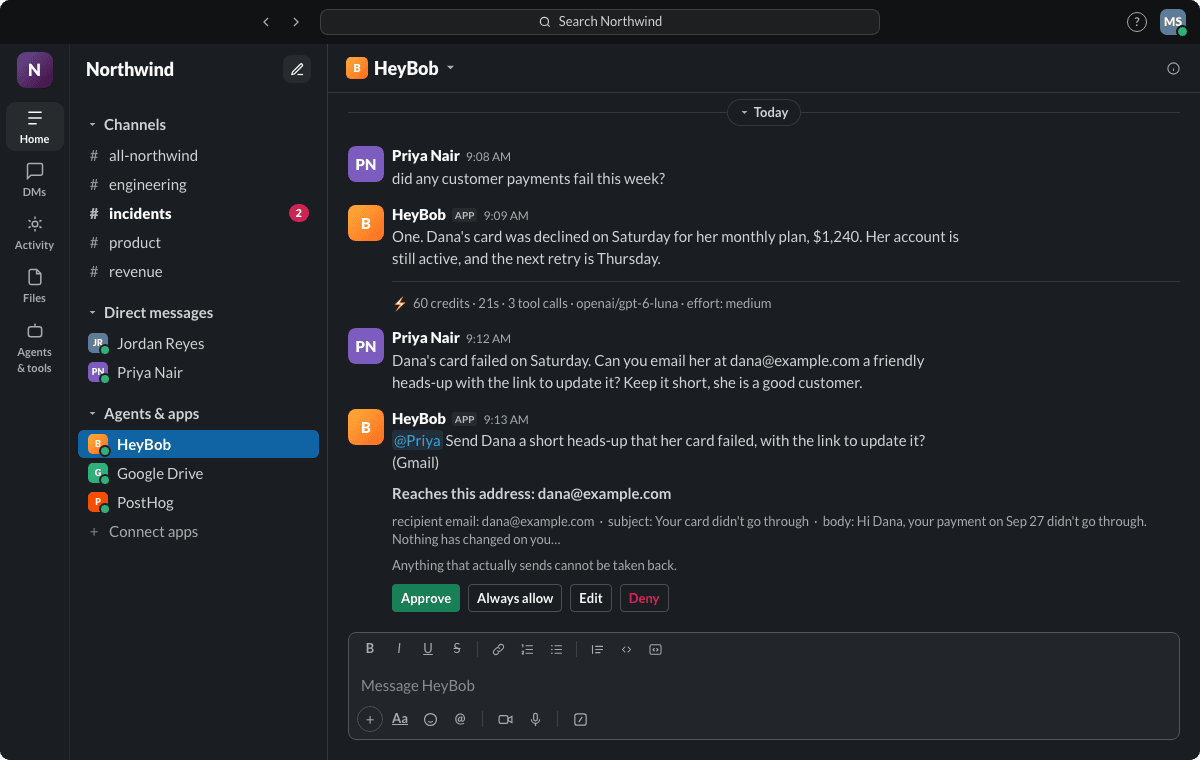
Before he changes a record or sends anything outside the company, he stops and asks in the thread. You pick which actions need a yes, and every job shows what it cost.
One price for the team, no per-person seats
One price covers everyone in your Slack. No seats to count, no plan to upgrade, and your first $100 of work is on us.
Comparing in detail? Bob vs ChatGPT · Bob vs Codex · Bob vs Claude Cowork
Neither would we. He asks first.
Bob can look at your tools on his own. Before he changes anything, he stops and asks in the thread, where your whole team can see.
You choose what needs a yes
Per tool and per action. Reading a spreadsheet can be automatic. Updating a customer record waits for you.
A receipt under every job
What it cost, how long it took, and who approved what. Ask "what ran this week?" any time.
A spending cap he won't cross
Set a monthly limit. He stops when he reaches it. No surprise bill.
Stop him mid-job
Changed your mind? Tap Stop on his progress message and he drops it.
Fix it, then approve
Not quite right? Edit what he's about to do before you say yes.
Pick who signs off
Only the people you name can approve anything that goes outside the company.
Set your house rules
Teach him a rule once, right in Slack. Changed a fact? Put the old one back in one click.
Set up in two minutes. Finished work by minute five.
Add him to Slack
One click. Slack shows exactly what he can access, and an admin approves it.
Connect a tool by asking
Name any app you use. He finds it and sends a sign-in link in the thread.
@HeyBob connect HubSpotGive him a real job
Not a demo task. Something from last week's to-do list.
@HeyBob what do last quarter's numbers say?Bob only answers when someone talks to him: mention @HeyBob in a channel he has been invited to, send him a direct message, or reply in a thread he is already in. He does not read channels he is not part of. /bob schedules shows what runs on a timer, /bob grants shows what he may do without asking, and /bob support reaches a person.
Everyone in your Slack can use him. No per-seat fees. End-of-year offer: half price, $37.50 a month, through December 31, 2026.
- First $100 of work free for 14 days
- No card to start
- Hard monthly spending cap
- Free redo if he gets a job wrong
Use your own AI account. Pay Bob one flat price.
Plug in the account your company already has. The AI bill goes straight to OpenAI or Anthropic at your rates, with no markup from us. Bob is $349 a month for the whole team, or $174.50 a month through December 31, 2026.
- No markup on your AI bill
- One flat fee, not per person
- Same approvals and receipts on every job
What people actually ask.
What is Bob, exactly?
An AI employee who lives in your Slack. He has his own secure computer in the cloud, signs into the tools you connect, and does the work. Then he reports back in the thread with the result and what it cost.
Will he change things without asking?
No. Anything that changes data in your tools waits for someone to tap Approve. You decide which actions, if any, are automatic.
Can he do things on a schedule?
Yes. Say "post the pipeline summary every weekday at 7:30". If a check finds nothing worth saying, he stays quiet instead of cluttering the channel.
Will scheduled jobs spam my channel?
No. If a check finds nothing worth saying, he posts nothing. Ask "what ran this week?" and he lists every run, what it found or why he stayed quiet, and what each one cost. You can set quiet hours for each schedule. If a schedule keeps failing, he pauses it and tells you why.
Can Bob react to things outside Slack?
Yes. Ask him for a webhook and he gives you a link. Point any system at it and he acts when it fires, like "when a ticket closes, tell the channel." He only posts when the event is worth mentioning.
What if he gets something wrong?
He can, like any AI. Check his work before you rely on it. If a job comes back wrong, you can have him redo it once for free, up to 10 redos per workspace a month.
Does he learn how we work?
Yes. He remembers your team's terms and decisions, and how each person likes their summaries. You can see and edit what he remembers. It is never used to train anyone else's AI.
What does it cost after the free $100?
$75 a month for the whole workspace, which buys 40,000 credits. New plans are half price, $37.50 a month, through December 31, 2026. You set a monthly cap and he stops at it. Unused credits roll over one month.
Do my credits expire?
Paid-plan credits roll over for one month, then expire. The 50,000 trial credits expire after 14 days. Top-up packs you buy never expire.
Can we bring our own AI account?
Yes, and you can set it up yourself. That plan is $349 a month. Paste your Anthropic and OpenAI keys into workspace settings and his work runs on your account, so the AI bill goes straight to your provider at your rates. Runs still use credits at the normal rate, so your balance shows roughly what your own AI bill will be. 1,000,000 credits a month are included, with top-up packs past that.
How do I know what a job cost?
Every finished job ends with a receipt in the thread: the credits it used, how long it took, and how many steps he took.
Get your day back. Give him one job.
You decide what he can spend and what he has to ask about. If he gets it wrong, the redo is on us.
Bob is powered by AI and can make mistakes: answers may be inaccurate, incomplete or out of date. Review his work before relying on it.