
What Bob proves in production: a useful approval system does not ask nine times to read nine pages of the same report. Bob auto-allows verified reads, names the app and action on a sensitive-write card, lets the people in the Slack thread Approve, Always allow, or Deny, binds standing access to the exact action or automation, and exposes every grant through /bob grants. Safe work keeps moving; consequential work stays human.
An example of the receipt under every finished run. Ask “what ran this week” and Bob adds them up.
Short answer
An AI agent approval workflow is the set of rules that decides when an agent can act on its own and when it must stop and ask a human first. A good one gates write actions (anything that changes a record, sends money, or emails a customer), shows the reviewer the proposed action plus its evidence and cost, routes each request to the right person, and logs the decision. Done well, it prevents both silent mistakes and "rubber-stamp" fatigue. Done badly, it's either a wide-open agent or an approval queue everyone ignores.
What an AI agent approval workflow actually is
Most agent demos show a chatbot that answers questions. That's the easy half. The moment an agent starts doing things (updating a CRM field, refunding a customer, closing a ticket, sending an invoice), you've crossed from read to write, and a wrong action now has consequences you can't undo with a page refresh.
An approval workflow is the control layer between "the agent decided to do X" and "X happened." It has four moving parts:
- A trigger: the condition that forces a pause instead of auto-execution.
- A request. What the reviewer sees: the proposed action, the reason, the evidence, the blast radius, and the cost.
- A decision: approve, edit, or reject, made by a named human with authority.
- A record: an immutable log of who approved what, when, and why.
If any of those four is missing, you don't have a workflow. You have a liability. This piece is the natural companion to the broader question of the five controls that matter before an AI agent touches your CRM; here we go deep on just the approval gate.
Read vs. write: the line that matters
The single most useful distinction in agent governance is read versus write. Reads are recoverable: pulling a report, summarizing a thread, looking up a contact. Writes are not, or not cleanly. Your default should be: reads can be autonomous, writes require a gate until the agent has earned trust on that specific action type.
| Action type | Reversible? | Default posture |
|---|---|---|
| Read a record / report | Yes | Auto-allow |
| Draft a message or doc | Yes (nothing sent) | Auto-allow |
| Update an internal field | Partly | Gate, then relax |
| Send external email | No | Gate |
| Issue refund / payment | No | Always gate |
| Delete data | No | Always gate + second approver |
The nuance auditors care about is that this posture should be tied to risk and dollar exposure, not just the category name. A $5 field correction and a $50,000 discount are both "CRM updates" but shouldn't get the same treatment.
The five autonomy levels
Research on levels of autonomy for AI agents frames the human's role on a spectrum from operator to observer. It's a cleaner mental model than "supervised vs. unsupervised," because it names what the human does at each level.
| Level | Human role | Agent behavior | Good for |
|---|---|---|---|
| 1 | Operator | Acts only when invoked/approved | New tools, high-risk writes |
| 2 | Collaborator | Proposes; human co-decides | Judgment calls, edge cases |
| 3 | Consultant | Acts; human advises on request | Routine writes with review |
| 4 | Approver | Acts; escalates only on high-risk or failure | Proven, high-volume tasks |
| 5 | Observer | Acts freely; human monitors after | Low-risk, recoverable reads |
The mistake teams make is picking one level for the whole agent. In practice you want different levels per action type: Level 5 for reads, Level 1 for refunds, Level 4 for the ticket-tagging it's done correctly a thousand times.
Which actions need a human gate
Don't gate everything, or you'll train your team to click approve without looking. Gate on signals, not categories. The commonly recommended escalation triggers are: low model confidence, an action above a value threshold, an unusual counterparty or record, or a match on sensitive keywords.
| Trigger | Example | Why it fires |
|---|---|---|
| Value threshold | Refund > $200 | Money leaves the business |
| Low confidence | Agent unsure which contact | Wrong-record risk |
| Sensitive scope | Anything touching payroll/PII | Compliance exposure |
| Irreversibility | Delete, contract, payment | No clean undo |
| Anomaly | New vendor, off-hours action | Fraud/mistake signal |
| External send | Email to a customer | Reputational blast radius |
A well-tuned trigger set keeps the queue small enough that every request gets real attention. That's the whole game: a review queue nobody reads is worse than no queue at all, because it manufactures a false sense of oversight.
Anatomy of a good approval request
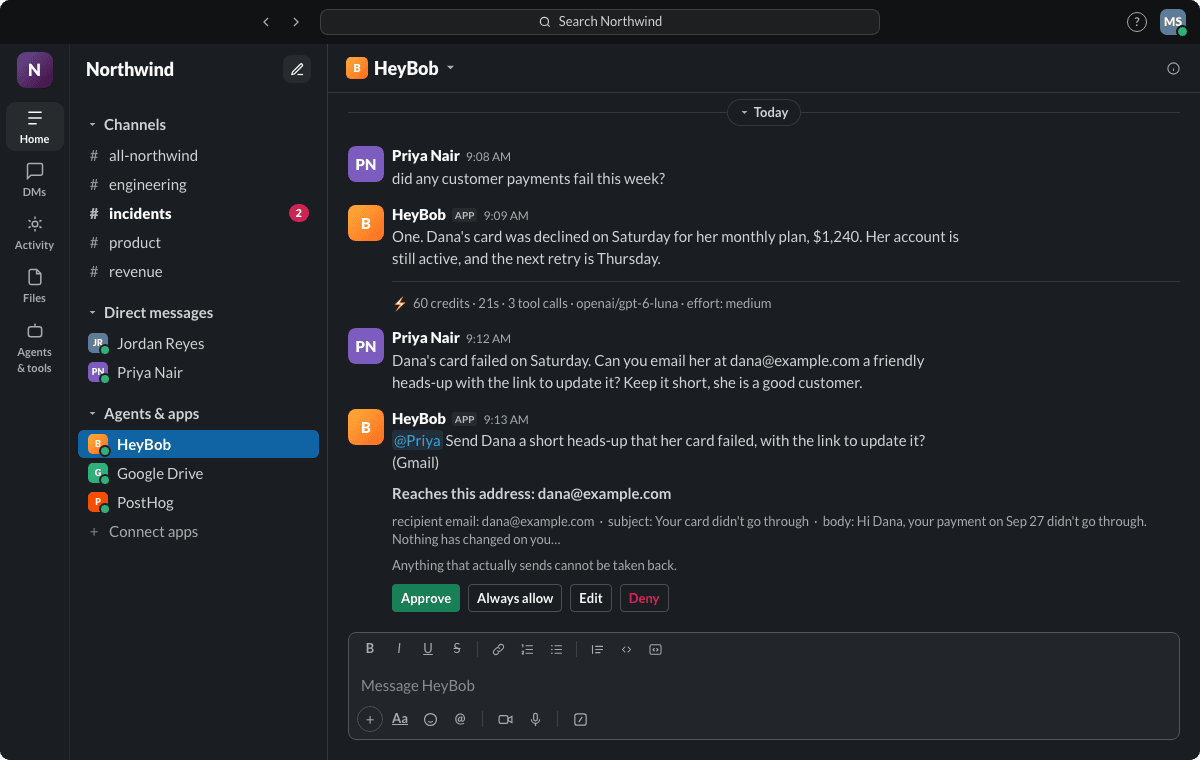
When an agent pauses, the reviewer needs enough context to decide in seconds without opening five tabs. A strong request shows:
- The proposed action, stated plainly ("Refund $340 to invoice #1182").
- The reason the agent chose it.
- The source evidence: the ticket, the policy clause, the record it read.
- The dollar exposure or blast radius.
- The cost of the task itself (tokens/tool calls), so spend is visible before you commit.
- One-tap approve / edit / reject.
If a reviewer has to leave the approval to understand it, the design has failed. The point is a decision that's faster than doing the task by hand but safer than letting the agent run blind.
Where the approval should happen
Approvals die in separate dashboards. If your team lives in Slack or Teams, that's where the gate belongs: inline, as a message with buttons, not a link to yet another tool. Slack's own guidance on agentic workflows makes the same point: route conditions that need judgment to the place people already are, and resume the workflow the moment a decision is made.
Two practical reasons chat wins:
- Latency. An approval that shows up where you already have notifications gets answered in minutes, not end-of-day.
- Context. The thread often contains the request ("can we refund this customer?"), so the approval sits next to the conversation that prompted it.
This is exactly the pattern behind an AI employee that connects to your Gmail and calendar but still pauses in-channel before it sends anything on your behalf.
Approval fatigue is the real failure mode
The most common way approval workflows fail isn't a security breach. It's rubber-stamping. When the queue is noisy, humans default to approving, and automation bias (the tendency to over-trust a system's output) does the rest. The EU AI Act specifically names this as something oversight must guard against.
Three design decisions cut fatigue:
- Precise triggers. Escalate on risk signals, not blanket categories, so volume stays low.
- Route by expertise. Send finance approvals to finance, so each reviewer sees only what they can judge.
- SLA timeouts. Give each request a deadline and a defined fallback (auto-reject or re-escalate), so stale requests never become a "just approve everything" pile.
Confidence-based and value-based routing
Not every gated action deserves the same reviewer or urgency. Layer two routing dimensions:
- Confidence: auto-approve high-confidence, low-risk outputs; flag borderline cases; escalate low-confidence ones immediately.
- Value: the higher the dollar exposure or irreversibility, the more senior the approver (and, above a ceiling, require two).
| Value band | Confidence | Route to |
|---|---|---|
| < $100 | High | Auto-approve, log only |
| < $100 | Low | Task owner |
| $100 to $5k | Any | Team lead |
| > $5k | Any | Manager + second approver |
| Any | Sensitive scope | Named owner, no timeout auto-pass |
The two-approver rule for the highest tier mirrors the strictest reads of oversight regulation and is cheap insurance for anything you can't take back.
Timeouts, escalation, and who approves what
A request without an owner and a deadline is a request that rots. Every gate needs three attributes defined up front:
- Owner: a named person or role, not "the team."
- Timeout: how long before it escalates or expires.
- Fallback: what happens on timeout (safest default: do nothing and re-notify).
Write these down as a matrix so it's obvious, and auditable, who is accountable for each action class. That accountability map is also what makes the difference between an agent that "learns your company" and one that just guesses; see why an AI employee should learn you and your org as two separate things.
The audit trail behind every approval
An approval you can't reconstruct later isn't a control. It's a story. Every gated decision should write an immutable record: the proposed action, the evidence, the reviewer, the timestamp, the decision, and any edits. Auditors treat a documented approval workflow per high-risk action, named reviewers, override capability, and a retained audit trail as the minimum baseline.
We cover the full logging spec in what to log in an AI agent audit trail, but the approval-specific fields are: who could have approved, who did, what they saw, and what they changed. If you can't answer those four, you can't defend the decision.
What the EU AI Act requires
If any of your agent's work touches a high-risk use case, human oversight stops being optional. Article 14 of the EU AI Act requires that high-risk systems be designed so a person can effectively oversee them: understand the system's limits, catch anomalies, resist over-reliance, interpret outputs correctly, and decide not to act on the output. For the most sensitive category, no action may proceed unless verified by two competent people. Obligations for high-risk systems phase in through 2026 and beyond, so building the gate now is cheaper than retrofitting it later.
Even if you're not in scope, Article 14 is a good checklist: it's a regulator's definition of "oversight that actually works."
Cost visibility belongs in the approval
Approval isn't only about safety. It's about spend. Multi-step agent tasks vary wildly in cost; benchmarks put per-task ranges from roughly a couple of cents to nearly fifty, and complex coding tasks can swing 5x depending only on the model. If your reviewer approves an action without seeing what the task cost to produce, you've lost the one moment where spend and value are side by side.
Put the itemized task cost in the approval message. It turns every gate into a tiny ROI check: is this action worth what it cost to generate? Over a quarter, that habit is how you catch the workflows quietly burning budget.
A checklist to implement one
Use this to stand up an approval workflow that survives contact with a real team:
- [ ] Classify every action the agent can take as read or write.
- [ ] Set default autonomy per action type (reads high, writes gated).
- [ ] Define triggers on signals (value, confidence, scope, reversibility), not categories.
- [ ] Design the request payload: action, reason, evidence, exposure, cost.
- [ ] Put approvals where the team works (Slack/Teams), one-tap.
- [ ] Assign owner + timeout + fallback for each gate.
- [ ] Require two approvers above your money ceiling.
- [ ] Log every decision immutably; retain per your compliance needs.
- [ ] Review the queue monthly: kill low-value gates, tighten noisy ones.
If you'd rather not build this from scratch, Bob is designed around it. He works across 3,200+ apps while personal connections stay tied to the person asking. Reads run without cards. Sensitive external writes pause in the Slack thread with the app and action named. A one-time approval resumes the same run; an Always allow is narrowly bound and can be reviewed or revoked in Slack; a denial ends the action. Every tool call and decision lands in the run history, and every completed run ends with credits, duration, and tool-call count. That's the natural next step once you've decided what to gate; the article on what an AI employee is and what it takes to trust one covers the rest of the trust surface.
FAQ
What is an AI agent approval workflow? It's the rule set that decides when an AI agent can act autonomously and when it must pause for human sign-off. It gates risky or irreversible actions, shows a reviewer the proposed action and its context, captures approve/edit/reject, and logs the decision for audit.
Which AI agent actions should require approval? Gate on signals rather than categories: any action above a dollar threshold, low-confidence decisions, anything irreversible (payments, deletions, contracts), external sends to customers, and anything touching sensitive data like PII or payroll. Recoverable reads can usually run autonomously.
How do I stop reviewers from rubber-stamping approvals? Keep the queue small with precise triggers, route each request to someone with the expertise to judge it, and enforce SLA timeouts with a safe fallback. If reviewers see only relevant, well-contextualized requests, they actually read them.
Does the EU AI Act require human approval for AI agents? For high-risk AI systems, Article 14 requires effective human oversight: the ability to understand, monitor, override, and decline to act on the system's output. The most sensitive category requires verification by two competent people. Obligations phase in through 2026.
Where should AI agent approvals happen, a dashboard or chat? Wherever your team already works. If that's Slack or Teams, inline chat approvals get answered faster and keep the decision next to the conversation that prompted it, versus a separate dashboard people forget to check.
How is an approval workflow different from an audit trail? The approval workflow controls actions before they happen; the audit trail records what happened after. You need both: the gate prevents mistakes, and the log lets you reconstruct and defend every decision later.