
- Bolt (by StackBlitz) builds apps and websites from a chat: code you own, GitHub sync, a database, logins, Stripe and custom domains.
- Bob is an AI coworker who builds small internal apps when the job needs one, hosted for you and private to your workspace by default.
- Bolt's connectors help while you build. A Bob app can read and write your connected tools while people use it, through the access of the person who made it.
- Bolt is $25/mo for 10M tokens on Pro, $30 per member on Teams, with hosting billed separately by traffic. Bob is one workspace fee from $75/mo.
- Keeping a Bob app running costs about $3 a month in credits if your team uses it a few hours each workday, and about $15 if it is busy around the clock. And it can use the 3,200+ apps your team already connected to Bob from day one.
- From October 7, 2026, Bolt trains AI models on your content unless you opt out. Bob never uses your data for training.
What Bolt is
Bolt, from StackBlitz, says it lets you “create stunning apps & websites by chatting with AI.” You build in a chat with a Plan Mode, can edit the code, download it or sync it with GitHub, and publish to a bolt.host address or your own domain on a paid plan.
Its Bolt Cloud adds databases, email and Google logins, file storage, server functions and Stripe payments. Teams get roles, private sites shared by email or company domain, and admin settings, with SSO and audit logs on Enterprise. Bolt lists SOC 2 Type 2.
What Bob is
Bob is an AI coworker. Your team asks him for work in Slack or in the HeyBob app for Mac, Windows and Linux, and he does it across the 3,200+ apps you connect: the report, the follow-up email, the update in the CRM. Writes wait for an Approve button by default, and every finished job posts a receipt with what it cost.
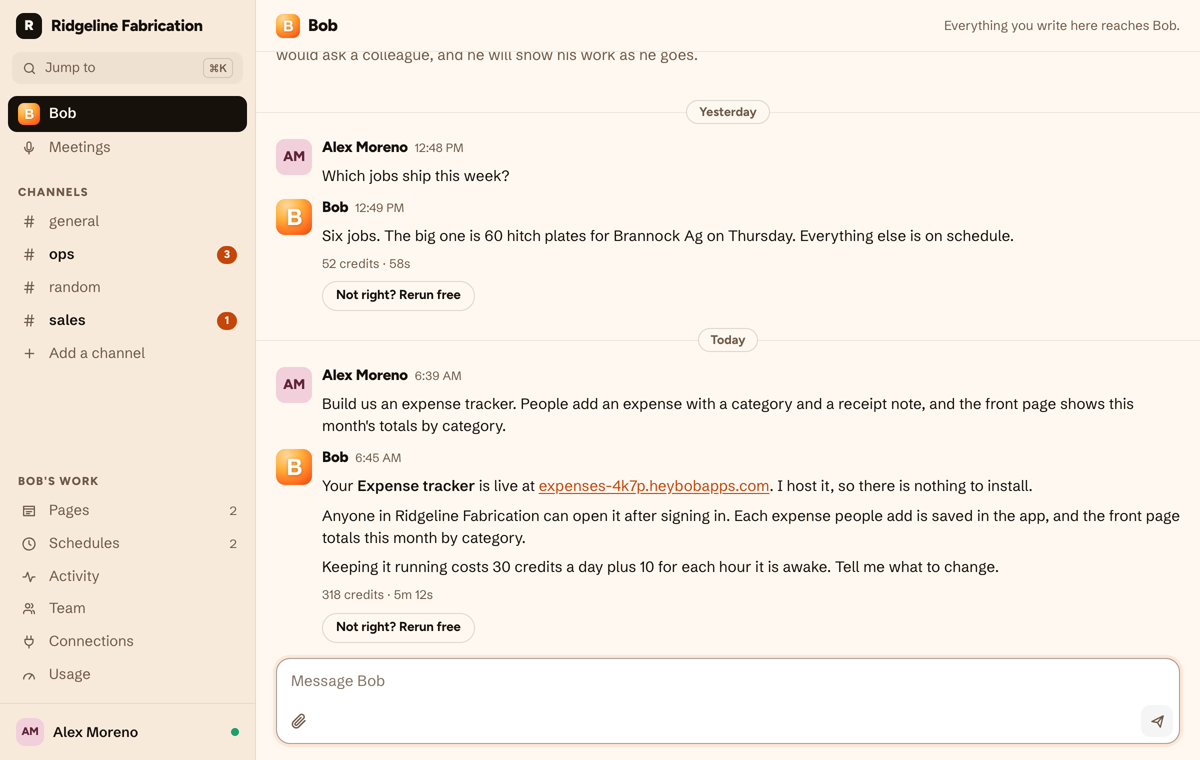
Sometimes the job is a small tool, and then Bob builds it. Ask for an expense tracker or a request board and he builds a small web app with its own database, hosts it at its own address, and keeps it private to your workspace unless you say otherwise. If the job is a view of numbers you already have, he builds a page instead, which costs nothing to keep.
A builder you open, or a coworker you ask
Bolt is a place to make and publish software. You open a project, chat until it looks right, check the code, and ship it to the web. That is the right shape when you are launching something people outside your company will use.
Bob starts from the work. Your team already asks him for reports and follow-ups in Slack or the HeyBob app, and your tools are already connected. When a job needs a tracker or a request board, he builds it in the same thread, hosts it, and keeps doing the work around it. The tradeoff is depth: Bob's apps are small internal tools, not products.
Use the data you already have
Most app builders start you from an empty database, then ask you to wire up connectors, keys or server code to reach your business data. With Bob, that part is already done. Your team connects its tools to Bob once, by asking (“connect HubSpot”), pressing Connect and signing in, and 3,200+ apps are on the menu.
When Bob builds an app, it can read those same tools, and write to them if you allow it, through the connection of the person who asked for it. That person approves each tool before the app goes live. Your Google Sheets, HubSpot deals or Gmail are in the app on day one, with no keys or server code. Bolt’s connectors help while you build. A live Bolt app reaches your other tools through server functions you write.
What it costs to keep an app running
Bob’s apps are billed in the same credits as the rest of his work: 30 credits a day to keep an app, plus 10 for each hour it is awake. When nobody is using it, it sleeps. At the entry plan’s rate ($75 for 40,000 credits), that works out like this:
| How much your team uses the app | Credits a month | In dollars |
|---|---|---|
| Opened now and then | About 1,000 | Under $2 |
| A few hours each workday | About 1,560 | About $3 |
| Busy around the clock | About 8,100 | About $15 |
Those credits come out of the workspace plan you already have, which is $75 a month (half price through December 31, 2026) and covers everything Bob does. So an app is a small slice of an existing bill, not a new subscription. If an app builder is all you want, Bolt costs less to start.
On Bolt, private sites need a paid plan. Pro is $25 a month and includes hosting up to 30 GB and 1M requests a month, with pay-as-you-go past that; Teams is $30 per member.
Side by side
What Bob’s apps do not do yet
We would rather you hear the limits from us than find them after you build.
- An app does not know who is using it yet. So there are no per-person views, roles or approvals inside an app.
- No custom domains, file uploads, payments or email sent from an app yet.
- No code export. Bob owns the build: you describe the change, he makes it.
- Signing in to a private app goes through Slack today. Teams on the HeyBob app without Slack can use public apps.
- A sleeping app takes a couple of seconds to wake up.
Which one should you pick?
Pick Bolt if…
- You are launching something public: a product, a site or a customer app with Stripe and your own domain.
- You want the code, in GitHub, to keep building on.
- You need on-brand screens from a Figma file or design system.
Pick Bob if…
- You need a small tool for your team, not a launch.
- The app should use your HubSpot, Gmail or Sheets data while people use it, without writing server code.
- You want one coworker who builds the tracker and keeps doing the work around it.
- You want a guarantee your data never trains anyone's AI.
Plenty of teams will use both: Bolt for what they ship to customers, Bob for the tools and busywork inside the company.
Fair questions
Is Bob a good Bolt alternative?
For internal tools, often yes: ask Bob in Slack or the HeyBob app and he builds, hosts and changes a small app for your team. For a public product, no. Bolt's code ownership, Stripe payments, custom domains and logins for outsiders are things Bob's apps do not do yet.
Can I export the code of an app Bob builds?
No. Bob keeps the code and changes it when you ask. If owning the code matters, Bolt's zip download and GitHub sync are the better fit.
How do the prices compare?
Bolt Pro is $25 a month for 10M tokens, Teams is $30 per member per month, and hosting is billed separately by traffic. Bob is one workspace fee from $75 a month for 40,000 credits that cover everything he does. An app he hosts costs 30 credits a day plus 10 for each hour it is awake.
Does either one train AI on my data?
Bob never uses your data, prompts or connected-tool content to train AI models. Bolt's settings say that from October 7, 2026 it uses your content to train its models unless you opt out, with training off by default in the EU, UK and Switzerland and for customers on a signed agreement.
Can a Bob app use our HubSpot or Gmail?
Yes. An app can read and write your connected tools through the connection of the person who made it, and that person approves each tool first. In Bolt, a live app reaches outside tools through server functions you write.
Bolt and StackBlitz are trademarks of their respective owner. HeyBob and Bob are products of Tiny Cloud Ventures. Comparison reflects public information as of October 6, 2026.