
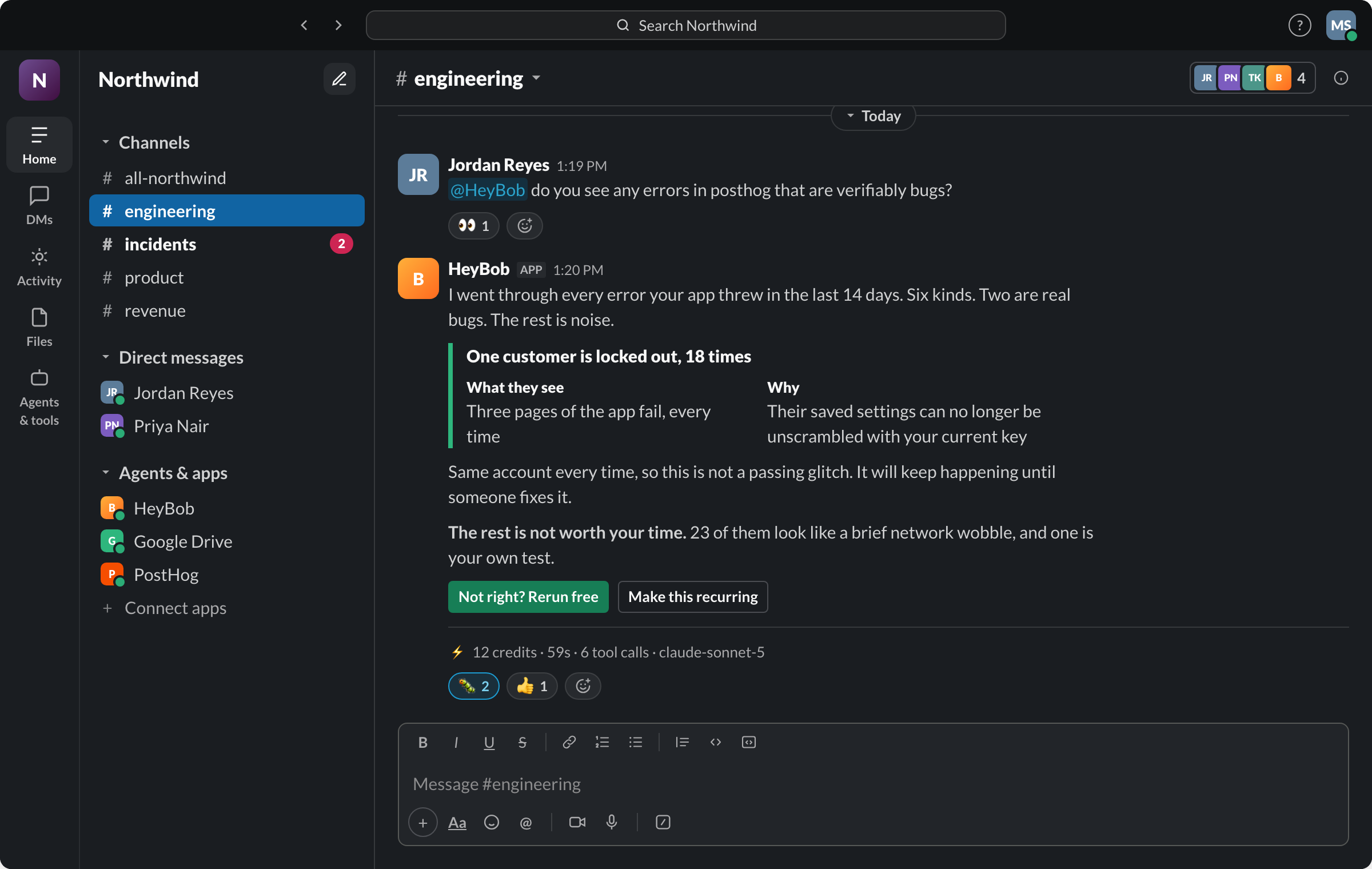
- Junior works natively inside Slack and Microsoft Teams; Bob works natively inside Slack, with Teams coming soon. Both connect to thousands of apps through a managed connector layer rather than making you build integrations yourself.
- Junior's positioning is close to Bob's: Slack native, approval gates, broad connectors through Pipedream Connect, plus Teams live today where Bob's is coming soon. Where the two differ is in what each publicly documents as gated by default versus configurable, and in what a buyer can verify before signing up.
- Junior ships 11 pre-built role templates (AI Sales Rep, AI Executive Assistant, and nine others) and proactive idle-time work; Bob does not document named role templates.
- Bob posts a compact receipt on every completed run, gates external writes behind approval by default, and lets a workspace set a hard monthly spend cap with an 80% warning.
- Several of Bob's newer differentiators, bring-your-own model keys, a persistent per-person default model, a REST API and MCP server, are not documented anywhere in Junior's public product, pricing, or docs pages reviewed August 23, 2026.
What Junior is
Junior is an AI coworker sold as one of 11 pre-built roles (AI Sales Rep, AI Executive Assistant, AI Media Buyer, AI SDR, AI Customer Support Rep, AI Operations Coordinator, AI Performance Marketer, AI Research Analyst, AI Recruiting Coordinator, AI Finance Assistant, AI Account Manager) that joins a Slack or Microsoft Teams workspace and is meant to act without being prompted for every task: reading meeting transcripts, working proactively when idle, and filing reports on its own. It connects to 3,000+ apps through Pipedream Connect, including Gmail, Notion, HubSpot, Google Calendar, GitHub, Stripe, Linear, Jira, Airtable, Google Drive, Zoom, Sheets, Figma, and Docs. Junior's handbook documents approval required by default before purchases or financial commitments and before posting publicly; its security docs describe other sensitive operations as configurable to require approval, rather than stating that all external writes are gated out of the box. Each Junior runs in an isolated Kubernetes namespace with dedicated compute and storage. Plans run from a free trial ($100 in credits, Claude Sonnet only) to a Standard plan with a flexible monthly budget from $100 to $20,000 that includes Claude Opus, to custom Enterprise.
What Bob is
Bob connects to 3,200+ apps and works across them from Slack or the HeyBob app for Mac, Windows and Linux, with Microsoft Teams coming soon. Every run executes in its own sandboxed cloud computer, external writes pause for an Approve/Deny button by default, and every completed task posts a compact receipt with total credits, duration, and tool-call count. Workspaces can set a hard monthly spend cap with a warning at 80%, reruns caused by Bob's mistakes are free.
What Bob connects to
An AI employee is only as useful as the systems it can reach. If the work lives in a tool Bob cannot open, you are back to copying and pasting, and the whole promise collapses. So the answer has to be boring and complete: Bob reaches 3,200+ apps, and connecting one takes a sentence in Slack and a sign-in.
Ask in the channel ("connect HubSpot"), Bob posts a Connect button, you sign in once on the hosted page, and that connection is ready for every run after it. Personal tools like Gmail, Google Calendar, HubSpot, and Linear connect per person, so a request runs against your row in the CRM and your inbox, under your own role, not a shared service account's.
| What your team runs | Apps Bob works in (examples) |
|---|---|
| CRM and pipeline | HubSpot, Salesforce, Pipedrive |
| Inbox and calendar | Gmail, Google Calendar, Microsoft Outlook |
| Docs and spreadsheets | Google Sheets, Google Drive, Notion, Microsoft Excel |
| Tickets and projects | Jira, Linear, Asana, ClickUp, monday |
| Support queues | Zendesk, Intercom, Front |
| Money and billing | Stripe, QuickBooks, Xero |
| Storefront | Shopify, WooCommerce, BigCommerce |
| Code and incidents | GitHub, GitLab, Sentry |
| Meetings and signatures | Zoom, Google Meet, Docusign, Calendly |
The catalog is the shortcut, not the ceiling. If your tool is not in it, Bob can work through its API, through an MCP server, or through the same browser your team uses, and for a core internal system we can build the connection. The full list is on the integrations page.
Whose side is your credit balance on?
Every product in this category charges by usage, so the vendor's revenue rises as your spend rises. That is not an accusation, it is simply how usage pricing works, and it means nothing about the product has to push your cost per task down.
Junior's answer to cost control is a budget slider: you pick a monthly figure between $100 and $20,000 and that figure is effectively the plan you're on, with a $100 top-up available anytime mid-cycle if you run past it. That is a real lever, but Junior's public docs do not describe a hard workspace-wide cap that stops spend with a warning before it hits, a per-run receipt, or a policy for reruns caused by its own mistakes. Bob is built the other way around: a receipt on every run so waste is visible the moment it happens, one hard monthly spend cap for the whole workspace with an 80% warning, unused credits that roll over a month, and free reruns when a run failed because Bob got it wrong.
Side by side
Which one should you pick?
Pick Junior if…
- You want to start from a named role template, like AI Sales Rep or AI Executive Assistant, instead of describing the job yourself.
- You want an agent that proactively works during idle time without being asked, not only in response to a mention.
- You want a single monthly budget slider rather than a fixed ladder of plans.
Pick Bob if…
- You want every external write gated behind approval by default, not just purchases and public posts.
- You want a receipt with every completed run instead of checking a balance at /account.
- You want one hard workspace-wide spend cap with a warning before you hit it, plus free reruns on Bob's mistakes.
- You want to bring your own Anthropic and OpenAI keys, or set a different default model per person.
Either way: an AI employee that finishes the job beats a dashboard of automations you have to check on. The category is right; pick the interface and the cost controls you can live with.
Switching?
Early customers switching from another AI-employee platform get the credits remaining on their existing commitment matched, and Bob performs the migration itself during onboarding: it reads your recurring tasks and playbooks and rebuilds them in your workspace.
Fair questions
Is Bob a good Junior alternative?
Junior works natively in Slack and Teams; Bob works natively in Slack, with Teams coming soon, so the positioning is close but not identical there. The differences also show up in the details: Bob gates every external write behind approval by default, posts a receipt on every completed run, and gives a workspace one hard spend cap with a warning before it hits. Junior's public docs describe approval as required by default for purchases and public posts specifically, with other sensitive operations configurable rather than gated out of the box.
How is Bob's pricing different from Junior's?
Junior's Standard plan is a flexible monthly budget slider from $100 to $20,000, with a $100 top-up available anytime mid-cycle, and a free trial of $100 in credits limited to Claude Sonnet. Bob starts at $75/month for 40,000 credits with the per-credit rate improving as volume grows, unused plan credits roll over one month, and every plan includes per-run receipts and a workspace spend cap. Enterprise pricing is custom for both.
Does Junior gate external writes the same way Bob does?
Not quite the same shape. Junior's public handbook says approval is required before purchases or financial commitments and before posting publicly; its security docs say other sensitive operations can be configured to require approval, which reads as opt-in rather than gated by default. Bob pauses for an Approve/Deny button before any external write by default, visible in the thread, with an Always allow an admin can grant per tool.
Can I bring my own model keys to Junior?
Not listed in public product or pricing docs reviewed August 23, 2026. Junior's Standard and Enterprise plans include access to Claude Sonnet and Opus as part of the subscription. Bob offers a $349/month flat BYOK plan: paste your own Anthropic and OpenAI keys, runs execute on your keys at your rates, and runs still use credits at the normal rate so the balance tracks your own AI bill, with 1,000,000 credits a month included.
Do Bob's credits expire?
Unused plan credits roll over one month before expiring, and one-off top-up packs never expire. Trial credits (50,000 credits, about $100 of work) last 14 days.
Junior is a trademark of its respective owner. HeyBob and Bob are products of Tiny Cloud Ventures, which is not affiliated with, sponsored by, or endorsed by Junior. This comparison is provided for informational purposes; details rechecked August 23, 2026 against Junior’s public site.