
- Slack's own AI is already in your plan. If the job is "summarize this channel" or "find that thread," it's the right tool and you don't need to add anything.
- On Business+, Slack's help site states Slackbot is capped at 15 messages per user per week, resetting Monday. Slack's CTO has said publicly that the limit needs revisiting.
- A July 2026 update gave Slackbot real code execution and slide/deck generation, but Slack's own announcement scopes those features to Enterprise+ at launch.
- Slackbot's native reach is Salesforce plus a small, limited-access MCP partner list. Bob connects to 3,200+ apps today, open to any workspace.
- Bob adds what a chat assistant doesn't do by design: a receipt on every completed run, a hard monthly spend cap, and approvals before writes across whatever it's connected to, not just Salesforce.
What Slack's AI is
Slack AI and Slackbot are built into Slack itself. Slackbot searches across messages, files, and connected apps, summarizes channels and threads, drafts a daily recap, and translates on request. Through Agentforce, it can also read and write Salesforce records from inside a Slack conversation, with a review-and-approve step before anything changes. A July 2026 update added real code execution in a sandbox and the ability to generate a shareable PowerPoint or Google Slides deck from source material, though Slack's own announcement scopes that to Enterprise+ customers at launch. It's a strong, fast-moving product, and it's already something you're paying for if you're on Business+ or Enterprise+.
What Bob is
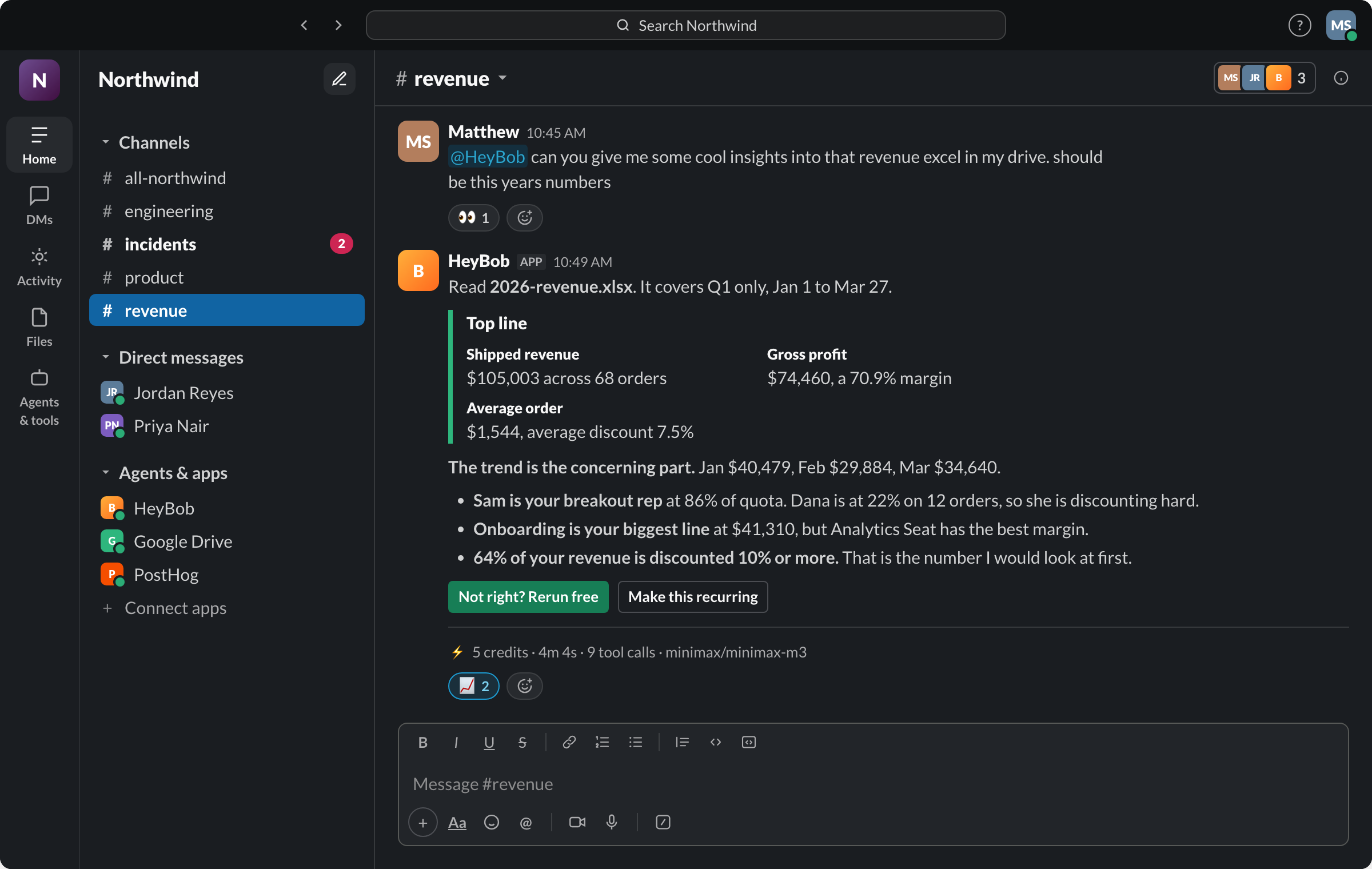
Bob is a separate AI employee you add to Slack. He works in his own sandboxed cloud computer, reaches 3,200+ connected apps under each person's own access, pauses for an Approve/Deny button before touching a system of record by default, and posts a compact receipt on every completed run: credits, duration, tool-call count, and who approved any sensitive write. He starts from a mention, a schedule described in plain language, an inbound webhook, or a dedicated email address, and workspaces can set a hard monthly spend cap he will not cross.
Where they actually differ
The honest split isn't "Slack's AI is weak." It shipped a genuinely capable set of features in 2026: code execution, file generation, Salesforce actions with approval, and an MCP client for connecting outside tools. The split is what each is built to be the front door for. Slackbot is built to be excellent inside Slack and Salesforce. Bob is built to be the thing you hand a job to and walk away from, across whatever your team actually runs on, with the receipt and the spend cap as the safety rails.
Side by side
Looking for the no-code automation comparison instead? See Bob vs Slack Workflow Builder, which covers Slack's visual automation tool, not its AI.
Which one should you use?
Use Slack's AI if…
- You want a channel summarized or a thread searched, right now, with nothing new to install.
- Your job is squarely inside Salesforce and Agentforce already owns that data.
- You're on Enterprise+ and want code execution or deck generation without leaving Slack.
Add Bob if…
- The job spans more than Salesforce: your CRM and your inbox and a ticket queue and a spreadsheet, in one run.
- You're on a plan where Slackbot's weekly message cap gets in the way of real work.
- You want a receipt and a hard spend cap on every AI task, not just Enterprise+ features.
- You want approvals before writes to any connected system, not only Salesforce.
Most teams end up running both. Slack's AI for the quick lookup in the moment it's needed, Bob for the job that needs to actually get done and reported back.
Fair questions
Is Bob a replacement for Slack AI or Slackbot?
No, and we wouldn't pitch it that way. Slack AI is included in your Slack plan and is the right tool for search, channel recaps, and daily summaries. Bob is a separate AI employee you add to Slack for jobs that need to reach 3,200+ apps, ask before a sensitive write, and post a receipt when the work is done.
What is the message limit on Slack's built-in AI?
On Business+, Slack's help documentation states members can send 15 messages to Slackbot each week, resetting Monday at midnight local time. We checked this on Slack's help site on August 23, 2026; check slack.com/help for the current number before you plan around it.
Does Slack's AI take actions in other apps, or just Salesforce?
Both. Slackbot can create and update Salesforce records directly, with a review-and-approve step before any change is made. Through its MCP client, launched in 2026, it also connects to a smaller, curated set of partner apps such as Atlassian, Linear, Notion, and Box, currently in limited-access rollout. Bob's 3,200+ connections are open to any workspace today.
Can Slack's AI run code or build files?
As of a July 2026 update, Slackbot can run real Python in a sandbox and hand back the output file, and can build a shareable PowerPoint or Google Slides deck from source material. Slack's own announcement scopes this to Enterprise+ customers at launch. Bob's sandboxed computer and file handling are included on every plan.
How is Bob priced differently from Slack AI?
Slack AI is bundled into your per-seat Slack plan; Business+ is listed at $18 per user per month. Bob is a separate workspace subscription starting at $75/month for 40,000 shared credits, with a $100 no-card trial, so you are paying for a second product on top of Slack either way.
Does Bob replace Agentforce?
Not for Salesforce-native work. If your job is squarely inside Salesforce, Agentforce has the deeper native integration. Bob is the better fit when the job spans systems Agentforce does not own: your CRM and your inbox and your ticket queue and your spreadsheet in one run, with a receipt and a spend cap on top.
Slack, Slackbot, Slack AI, Agentforce, and Salesforce are trademarks of Salesforce, Inc. HeyBob and Bob are products of Tiny Cloud Ventures, an independent company that builds Bob to run inside Slack. This page is not affiliated with, sponsored by, or endorsed by Slack or Salesforce, and it is not a criticism of our host platform: Bob depends on Slack working well. Details rechecked August 23, 2026 against Slack's and Salesforce's public product, pricing, and help pages; if something has changed since, let us know.