
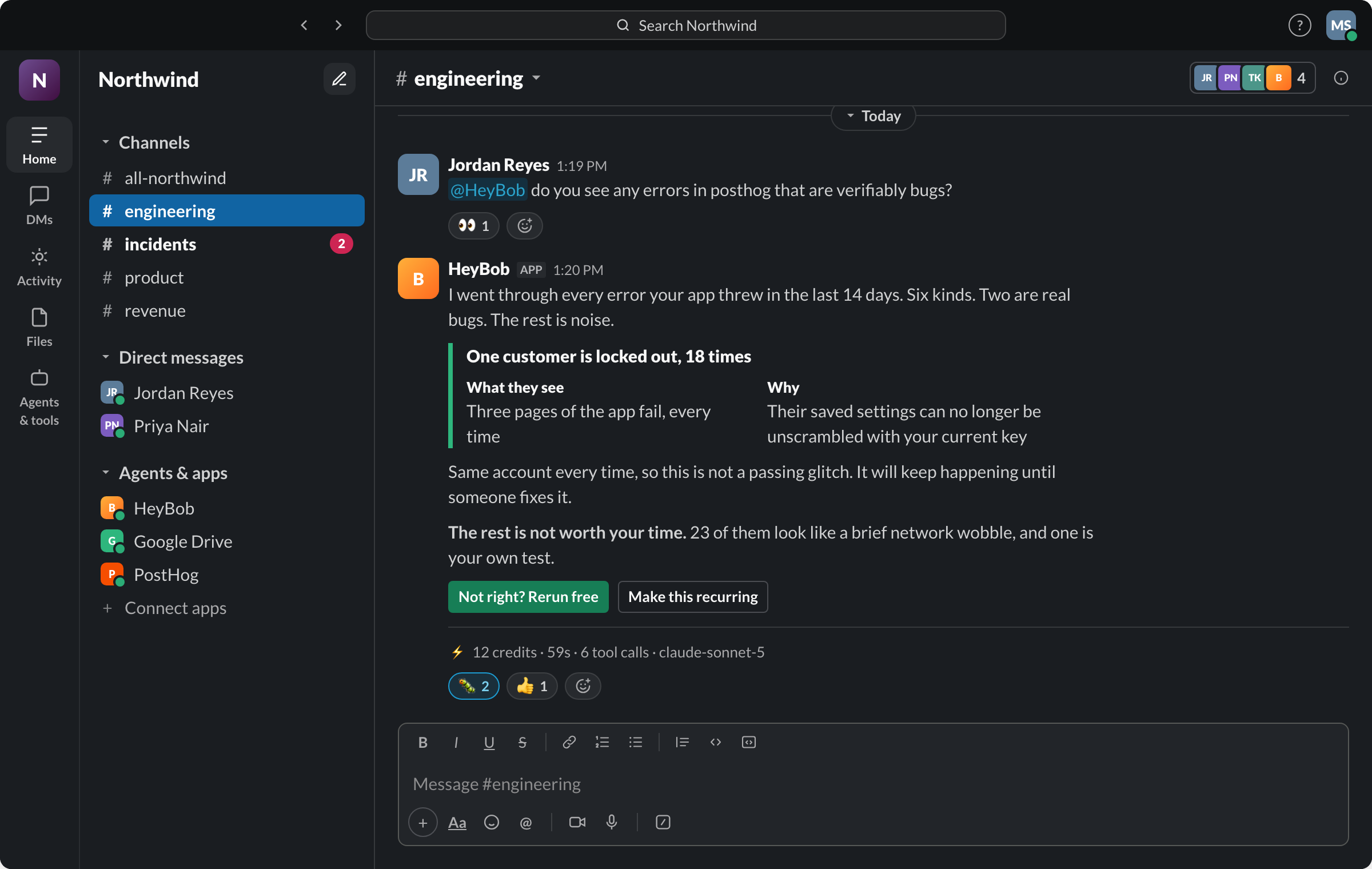
- Answers and work are different products. Slack AI and ChatGPT answer, summarize and draft. HeyBob, Viktor, Lindy and Claude Tag go into your other apps and finish the job.
- Seat pricing is the hidden cost for a growing team. Lindy, Dust, Slack AI and Claude Tag all scale with people. HeyBob, Viktor and Zapier Agents charge per workspace or account.
- Most bills are credits now. What matters is whether you can see what each job cost and stop the spend before it surprises you. HeyBob posts a receipt under every finished job and lets you cap spend per person and per workspace.
- Pick by your team’s first job, not by the longest feature list. Each entry below says who it suits.
The nine at a glance
Prices are the entry paid price, read from each vendor’s pricing page on October 30, 2026. Credit-based plans scale up from there.
| Agent | Best for | Paid plans start at | Priced by |
|---|---|---|---|
| HeyBob | Small teams handing off real work across their apps, with a bill they can see | $75/mo for 40,000 credits | Workspace |
| Viktor | Ops-heavy teams in Slack or Microsoft Teams who want finished reports posted | $50/mo; Team plan $100/mo for 40,000 credits | Workspace |
| Claude Tag | Teams already paying for Claude Team who want a shared Claude in channels | Claude Team seats from $20/seat/mo yearly, plus usage | Seat plus usage |
| Lindy | No-code assistants for email, meetings and calendar | $29.99 per active user/mo for 3,000 credits each | Active user |
| Dust | Several narrow agents built on company knowledge | €24/seat/mo yearly, €30 monthly | Seat |
| Zapier Agents | Teams already running their automations on Zapier | About $33/mo yearly for 1,500 activities | Account |
| Slack AI | Summaries, search and drafts inside Slack | Included in Slack plans; Business+ $15/user/mo yearly | User |
| Crevio | Very small businesses selling online and running it from Slack | Free, then $16/mo yearly | Account, plus a fee on sales |
| ChatGPT in Slack | Teams already on ChatGPT Business | About $20/user/mo yearly | User |
How we judged them
Does it finish the work?
An answer in a thread is useful. A CRM record updated, an email sent and a report posted is a different product. We say which one each tool is.
Can you see what it cost?
Almost every agent bills in credits. The question is whether you find out per job, or at the end of the month.
Does it ask before acting?
Small teams don’t have an admin reviewing every automation. An approval step before sending or changing things is the safety net.
Does the price fit 5 to 50 people?
Seat pricing is fine at five people and painful at forty. We note how each one scales.
1. HeyBob
Who it’s for: a 5 to 50 person team that wants to hand Bob the work that wastes its day, the weekly report, the CRM clean-up, the follow-up emails, and see exactly what each job cost. Bob lives in Slack, and in the HeyBob app on Mac, Windows and Linux for teams that aren’t on Slack.
- Price, checked October 30, 2026: Flex from $75 a month for 40,000 credits, up to $1,425 for 1,200,000. One price for the whole workspace, no seats. Unused credits roll over one month; $40 top-up packs of 20,000 credits never expire. Bring your own OpenAI or Anthropic account for $349 a month with 1,000,000 credits included. New monthly plans are half price through December 31, 2026. You start with $100 of work on us. See pricing
- Best for: work that crosses apps. Gmail, Google Calendar, HubSpot, Linear, GitHub, Notion and Google Sheets connect natively, and 3,200+ apps through the catalog.
- What stands out: he asks before acting, with the real email or change on the card. There is a receipt on every run, with credits, time, steps and model. Spend caps per person and per workspace come on every plan, and a free rerun when Bob gets it wrong. The HeyBob app also takes meeting notes with no bot in the call and does the follow-ups.
- Watch out for: no Microsoft Teams support yet. No published SOC 2 report. Trial credits must be used within 14 days, where Viktor’s free credits don’t expire. Meeting notes need the Mac or Windows app.
More on how approvals work and credits and spending caps.
2. Viktor
Who it’s for: teams that want an AI employee in Slack or Microsoft Teams, especially for recurring reports that pull from several tools.
- Price, checked October 30, 2026: a free plan with up to $100 in credits that never expire. Team is $100 a month for 40,000 shared credits, with tiers from $50 to $5,000 a month. No per-seat fees. Unused credits roll over one month. Enterprise is custom.
- Best for: teams on Microsoft Teams today, which Viktor supports natively alongside Slack.
- Watch out for: cost per job varies widely. Viktor’s own pricing page puts a quick task at 100 to 300 credits and a full project at 2,000 to 5,000, so on the Team plan that is about 25 to 75 cents for a quick task and $5 to $12.50 for a project.
Side by side: Bob vs Viktor.
3. Claude Tag
Who it’s for: teams already on Claude Team or Enterprise that want one shared Claude working in their channels.
- Price, checked October 30, 2026: Claude Team seats are $20 a month billed yearly or $25 monthly, for teams of 2 to 150. Claude Tag work is billed by usage on top of seats, and admins can cap that spend per organization and per channel.
- Best for: long-running work a channel steers together, from a model a lot of teams already trust.
- Watch out for: it is in beta. It acts as one shared identity per channel rather than as the person who asked. You pay seats before any usage.
Side by side: Bob vs Claude Tag.
4. Lindy
Who it’s for: people who want a no-code assistant for their own inbox, calendar and meetings, reachable from Slack.
- Price, checked October 30, 2026: a free trial with $50 in credits for 7 days. Team bills every active user from $29.99 a month for 3,000 credits each, pooled across the team. Extra credits are $10 per 1,000. Enterprise adds HIPAA, SSO, SCIM and audit logs.
- Best for: personal assistant jobs, with 1,500+ apps and an approval-request step with buttons in Slack.
- Watch out for: the bill grows with every person who uses it, and Lindy says its credits don’t roll over month to month.
Side by side: Bob vs Lindy.
5. Dust
Who it’s for: teams that want to build several narrow agents, like a support-policy agent or a sales-collateral agent, on top of company knowledge.
- Price, checked October 30, 2026: Free with 500 lifetime credits. Pro is €24 per seat a month yearly or €30 monthly, with 8,000 credits per seat. Max is €120 yearly or €150 monthly. Enterprise is custom.
- Best for: choice of models, with 20+ from several providers, and agents grounded in your documents.
- Watch out for: per-seat pricing. Credits reset monthly with no rollover. The self-serve plan caps you at 3 data connectors and 5 remote MCP servers. Slack is one surface among several, not its home.
Side by side: Bob vs Dust.
6. Zapier Agents
Who it’s for: teams whose automations already run on Zapier and who want agents on the same connections.
- Price, checked October 30, 2026: Agents are billed separately from Zapier tasks, in activities. Free includes 400 activities a month. Pro is about $33 a month billed yearly for 1,500 activities. Zapier’s core plans start at $19.99 a month yearly.
- Best for: breadth. Zapier says agents reach 9,000+ apps, and there are Slack templates for helpdesk replies and thread summaries.
- Watch out for: two meters to track, tasks and activities. We couldn’t find an approve-before-acting step described on the Agents page.
7. Slack AI (Slackbot)
Who it’s for: any team that mostly needs to catch up, search and draft inside Slack.
- Price, checked October 30, 2026: basic AI features, including summaries, search and daily recaps, are on every Slack plan. Business+ is $15 per user a month yearly or $18 monthly and includes Slackbot as a personal agent, with plan limits. Enterprise+ is $45 per user a month and adds search across connected apps.
- Best for: zero setup. It may already be in what you pay for.
- Watch out for: it works mainly on what is already in Slack. It doesn’t go off and finish jobs in your CRM or inbox the way an agent does.
Side by side: Bob vs Slack AI.
8. Crevio
Who it’s for: a very small business that sells online and wants the site, store and Stripe payments built and run from Slack.
- Price, checked October 30, 2026: Starter is free with a 5% fee on sales. Pro is $16 a month yearly ($20 monthly) with a 2.5% fee. Business is $40 a month yearly ($50 monthly) with a 1% fee. Unused credits roll over one billing cycle.
- Best for: getting a small online business running, with an approval step before actions that touch customers, payments or publishing.
- Watch out for: the fee on sales adds up as you grow. It is a business builder first, so check that it covers the internal work you want handed off. Crevio publishes its own Slack agent list, as do Viktor and we.
9. ChatGPT in Slack
Who it’s for: teams already paying for ChatGPT Business who want it in their channels.
- Price: ChatGPT Business is about $20 per user a month billed yearly, $25 monthly, with a 2-seat minimum. OpenAI’s pricing page blocked our checker, so this figure comes from independent pricing write-ups and Crevio’s list, read October 30, 2026.
- Best for: a familiar assistant for drafting and questions.
- Watch out for: per-seat pricing. It is a chat assistant first, so check what it can change in your other tools before you count on it for work.
Side by side: Bob vs ChatGPT.
Also on other lists, and why they aren’t picks here
Other roundups for this search, including Crevio’s and Viktor’s, include these. They are good products for a different buyer.
| Tool | Who it suits | Why not for a small team |
|---|---|---|
| Glean | Companies whose knowledge is spread across dozens of systems | Sales-led and quote only, per both lists |
| Salesforce Agentforce | Salesforce customers with an admin team | Needs a Salesforce edition underneath |
| Moveworks | IT and HR at large companies | Quote only, with enterprise rollouts |
| Atlassian Rovo | Teams living in Jira and Confluence | Built around Atlassian, not general work |
| Notion Custom Agents | Teams whose knowledge lives in Notion | Needs Notion’s Business plan |
| ClearFeed | Turning Slack channels into a helpdesk | One job, support, rather than general work |
Descriptions from Crevio’s and Viktor’s lists, read October 30, 2026.
Not only Slack?
If what you’re really hiring for is someone to keep up with email, calendar, the CRM, docs and meetings, read the best AI employee for small business. It ranks the field on that work, with approvals and spend caps, wherever your team talks. New to the category? Start with what a Slack AI agent is, AI assistants for Slack, or what an AI coworker does. Every head-to-head we’ve written is on the compare page.
Fair questions
What is the best AI agent for Slack for a small team?
It depends on the job. For a 5 to 50 person team that wants work finished across its apps with a fixed monthly bill, HeyBob and Viktor are the closest fits: both charge per workspace, not per seat. HeyBob adds a receipt on every finished job, approvals before he changes anything in your apps, and spend caps per person and per workspace on every plan. If you only need summaries and search inside Slack, Slack AI may already be in your plan.
Do AI agents for Slack charge per seat?
Some do. As of October 30, 2026, Lindy bills every active user from $29.99 a month, Dust charges per seat from 24 euros a month billed yearly, Slack AI features come with Slack’s per-user plans, and Claude Tag sits on top of Claude Team seats. HeyBob, Viktor and Zapier Agents price per workspace or account instead.
Which AI agents for Slack ask for approval before acting?
HeyBob asks before he changes anything in your apps when you start a job, and shows the real details on the card: who a message reaches and what it says. Lindy offers an approval step with buttons in Slack, and Crevio asks before actions that touch customers, payments or publishing. Check each product’s docs for what is covered by default.
Is Slack AI enough, or do I need an AI agent?
If the job is catching up on channels, searching Slack or drafting a message, Slack AI is the right tool and may already be in your plan. If the job is doing work in other apps, like updating the CRM, sending a follow-up email or building a weekly report, you need an agent that connects to those apps.
How did you pick and rank these tools?
We started from the tools on the current top lists for this search, including Crevio’s and Viktor’s own roundups, and judged each on four things a small team feels: whether it finishes work or only answers, whether you can see what each job cost, whether it asks before acting, and whether the price works without counting seats. HeyBob is our product and is listed first. Every price was read from the vendor’s own pricing page on October 30, 2026 unless noted.
Viktor, Claude, Lindy, Dust, Zapier, Slack, Crevio, ChatGPT and the other products named here are trademarks of their owners. HeyBob and Bob are products of Tiny Cloud Ventures, which is not affiliated with, sponsored by, or endorsed by any of them. Prices and features were read from each vendor’s public site on October 30, 2026 and change often. If something here has gone stale, tell us and we’ll correct it.