
- Judge an AI employee by the jobs it finishes, not by how well it chats. The useful ones work across email, calendar, the CRM, docs and meetings.
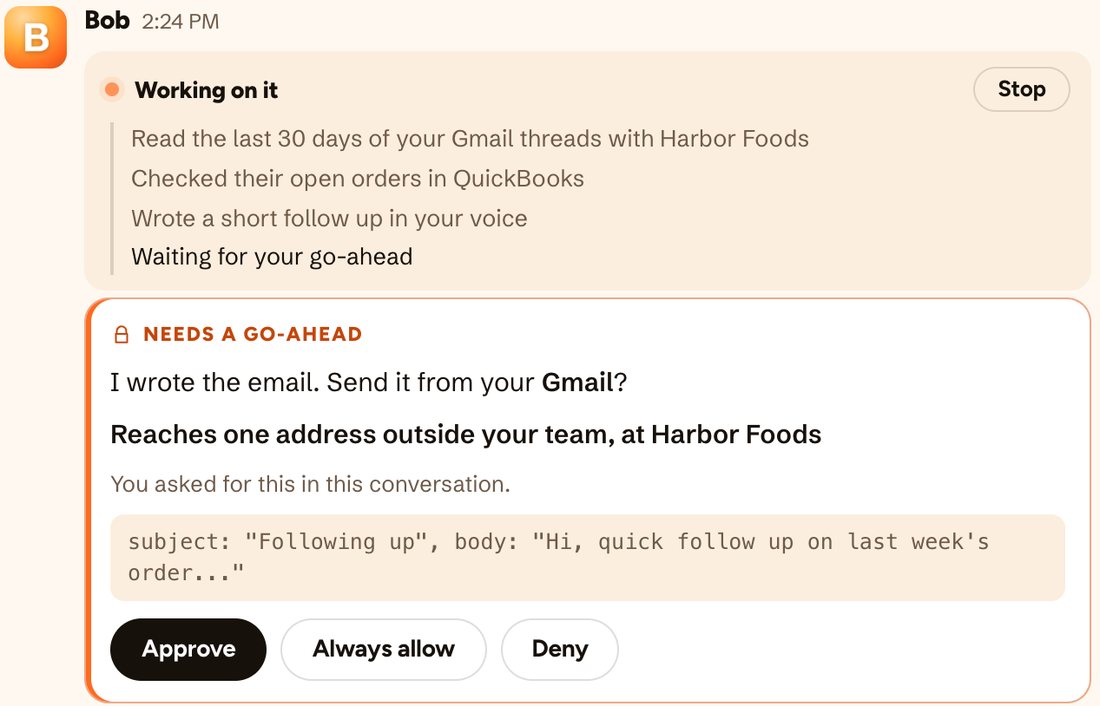
- Control matters more than cleverness. Before it touches your inbox, know whether it asks before acting, what each job cost, and how to cap the spend.
- For 5 to 50 people, watch for per-person pricing. HeyBob, Viktor and Tasklet price the whole workspace or organization. Lindy bills every active user.
- Sintra is the low-cost pick for a bundle of ready-made helpers. HeyBob and Viktor are the picks for handing off work across your whole stack.
The jobs a small business actually hands off
A chatbot answers questions. An AI employee should take specific weekly chores off your plate. These are the five kinds of work this guide judges on:
Read the threads, draft the reply or follow-up, and send it once you’ve looked.
Calendar
Find the slot, book the call, prepare the brief before it starts.
CRM
Log the call, update the deal, chase the contact who went quiet.
Docs and sheets
Build the weekly report from the numbers, keep the tracker current.
Meetings
Take the notes, pull the action items, and do the follow-ups.
Five questions to ask before you hire one
- Does it ask before it sends or changes anything? And does the approval show the real details, like who an email reaches, or just “OK?”
- Can you see what each job cost? A monthly invoice is too late to learn that one report burned a week of credits.
- Can you cap spend per person and for the whole business? One enthusiastic teammate shouldn’t be able to empty the account.
- What happens when it gets something wrong? Is there a way to redo the job without paying twice?
- Does the price grow with headcount, and do unused credits expire? Both decide what you really pay at 20 or 40 people.
The six at a glance
| AI employee | Best for | Paid plans start at | Priced by | Unused credits |
|---|---|---|---|---|
| HeyBob | Handing off work across email, calendar, CRM, docs and meetings, with approvals and caps | $75/mo for 40,000 credits | Workspace | Roll over one month |
| Viktor | Recurring reports across several tools, in Slack or Microsoft Teams | $50/mo; Team $100/mo for 40,000 credits | Workspace | Roll over one month |
| Lindy | A personal assistant for your own inbox, calendar and meetings | $29.99 per active user/mo | Active user | Don’t roll over |
| Tasklet | Everyone on one plan without counting seats | $25/mo for 10,000 credits | Organization | Not stated |
| Sintra | A bundle of ready-made helpers at a low monthly price | $15.60/mo on a 12-month plan | Account | Not stated |
| Zapier Agents | Businesses already running on Zapier | About $33/mo yearly for 1,500 activities | Account | Not stated |
All prices read from each vendor’s pricing page on October 30, 2026.
1. HeyBob
Who it’s for: a 5 to 50 person business that wants Bob to do the work that wastes its day across the apps it already uses, and wants to stay in control of what he sends and what he spends. You ask in Slack or in the HeyBob app on Mac, Windows and Linux.
- The work: Gmail, Google Calendar, HubSpot, Google Sheets, Docs and Drive, Notion, Linear and GitHub connect natively, plus 3,200+ apps through the catalog. The HeyBob app takes meeting notes with no bot in the call on Zoom, Google Meet, Teams calls, Webex and Slack huddles, and a Do it button hands any action item to Bob.
- The controls: he asks before acting, and the card shows who a message reaches. Scheduled jobs run only inside the apps you allowed. There is a receipt on every run. You get spend caps per person and per workspace: the workspace cap warns at 80% and starts no new jobs at the limit, and per-person caps live on the Spend page. Not right? Rerun free.
- Price, checked October 30, 2026: from $75 a month for 40,000 credits, up to $1,425 for 1,200,000, for the whole workspace with no per-seat fee. Credits roll over one month, and $40 top-ups of 20,000 credits never expire. Bring your own model account for $349 a month with 1,000,000 credits included. New monthly plans are half price through December 31, 2026, and you start with $100 of work on us. See pricing
- Watch out for: no Microsoft Teams chat support yet. No published SOC 2 report. Trial credits must be used within 14 days. Meeting notes need the Mac or Windows app.
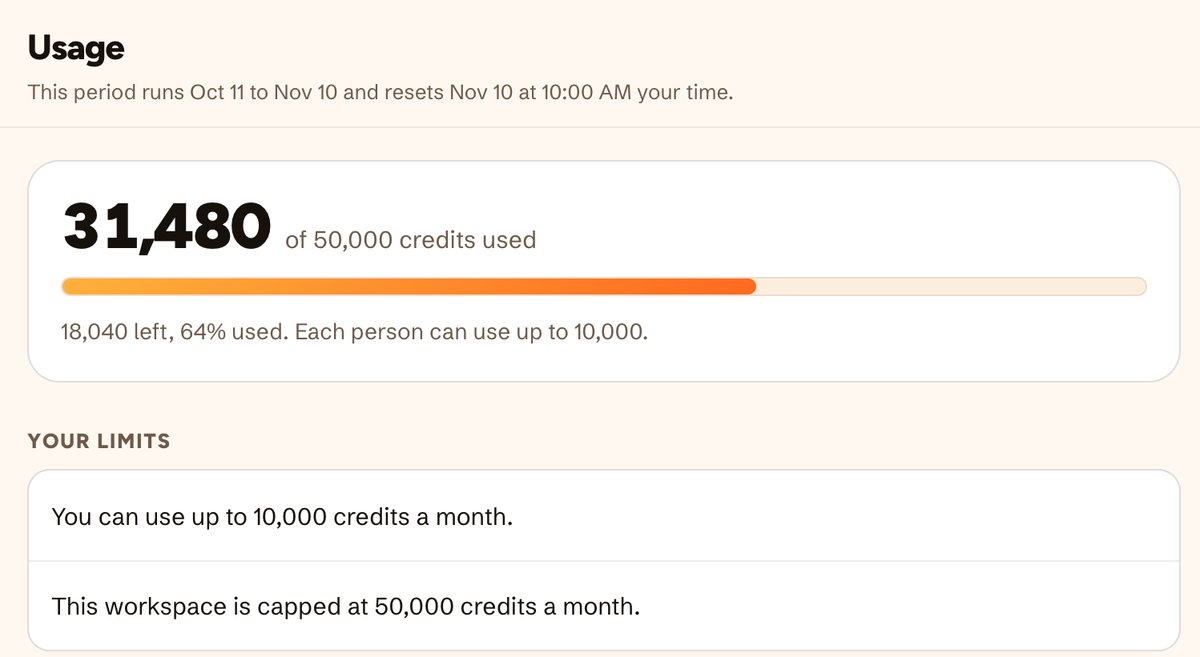
How the caps work: credits and spending caps, approvals, scheduled jobs and teammates and permissions.
2. Viktor
Who it’s for: businesses that want an AI employee in Slack or Microsoft Teams, especially for recurring reports that pull from several tools.
- Price, checked October 30, 2026: a free plan with up to $100 in credits that never expire. Team is $100 a month for 40,000 shared credits, with tiers from $50 to $5,000 a month. No per-seat fees. Unused credits roll over one month. 15% off for nonprofits.
- Best for: businesses on Microsoft Teams, which Viktor supports natively alongside Slack.
- Watch out for: cost per job varies widely. Viktor’s own pricing page puts a quick task at 100 to 300 credits and a full project at 2,000 to 5,000.
Side by side: Bob vs Viktor.
3. Lindy
Who it’s for: an owner or a few people who each want a personal assistant for their own inbox, calendar and meetings.
- Price, checked October 30, 2026: a free trial with $50 in credits for 7 days. Team bills every active user from $29.99 a month for 3,000 credits each, pooled. Extra credits are $10 per 1,000. Enterprise adds HIPAA, SSO, SCIM and audit logs.
- Best for: breadth, with 1,500+ apps, and an approval step with buttons in Slack you can add to a workflow.
- Watch out for: the bill grows with each active user, and credits don’t roll over month to month.
Side by side: Bob vs Lindy.
4. Tasklet
Who it’s for: a business that wants everyone on one plan without counting seats.
- Price, checked October 30, 2026: a free trial with credits. Starter is $25 a month for 10,000 credits, Pro $100 for 40,000, and Custom from $250 for 100,000 to 4,000,000+. Billed per organization with unlimited members, plus 600 free bonus credits a day. One-time credits are $5 per 1,600, $25 minimum.
- Best for: a low starting price for a whole team.
- Watch out for: Starter’s 10,000 credits is a quarter of what $75 to $100 buys elsewhere, so price the plan against the work you plan to hand off.
Side by side: Bob vs Tasklet.
5. Sintra
Who it’s for: a solo owner or very small business that wants a bundle of ready-made helpers at a low monthly price.
- Price, checked October 30, 2026: all 12+ helpers for $15.60 a month on a 12-month plan, $23.60 a month on a 3-month plan or $48.50 for one month, each shown as a sale against a higher regular price. A single helper is $39 a month. Plans include 250 monthly credits and 15+ integrations, with a 14-day money-back guarantee.
- Best for: getting started cheaply with helpers that each focus on one role.
- Watch out for: 250 credits a month is a small allowance for a team handing off daily work, and 15+ integrations is a short list next to the others here. The lowest monthly price needs a 12-month commitment.
6. Zapier Agents
Who it’s for: a business whose automations already run on Zapier.
- Price, checked October 30, 2026: agents are billed in activities, separately from Zapier tasks. Free includes 400 activities a month, and Pro is about $33 a month billed yearly for 1,500.
- Best for: reaching an unusual app, with 9,000+ in Zapier’s catalog.
- Watch out for: two meters to track. We couldn’t find an approve-before-acting step described on the Agents page.
Built for bigger companies, or for one job
Other “AI employee” lists include these. They are serious products, just not a general helper for a 5 to 50 person business.
| Tool | What it does | Why it isn’t a pick here |
|---|---|---|
| 11x and Artisan | AI sales reps for outbound prospecting | One job: sales outreach |
| Sierra | Customer service agents for large brands | One job, sold to enterprises |
| Ema | AI employees for enterprise teams | Sales-led enterprise rollouts |
| Relevance AI | Builder for custom agent teams | A platform to build on, not a ready helper |
| Devin and OpenHands | Coding agents | For software teams, not business operations |
| Glean and Moveworks | Company search and IT or HR help | Quote-only enterprise pricing |
Drawn from Vellum’s, Viktor’s and Lindy’s published lists, read October 30, 2026. Compare more: Bob vs Ema, Bob vs Claude Cowork, Bob vs ChatGPT, or every comparison.
Mostly working in Slack?
If your team runs on Slack and the question is which agent to add to it, read the best AI agents for Slack for small teams. It covers Slack AI, Claude Tag, Dust, ChatGPT and Crevio, which aren’t here. For background, see what an AI employee is, what one costs, what an AI coworker does, Slack AI agents and AI assistants for Slack.
Fair questions
What is the best AI employee for a small business?
For a 5 to 50 person business that wants everyday work done across email, calendar, the CRM, docs and meetings, pick one that asks before acting, shows what each job cost and lets you cap spend. HeyBob does all three on every plan, with one workspace price and no seats. Viktor is the closest alternative and supports Microsoft Teams. If you want a set of ready-made helpers for marketing jobs at a low monthly price, look at Sintra.
How much does an AI employee cost for a small business?
As of October 30, 2026, paid plans start around $15 to $100 a month. HeyBob starts at $75 a month for 40,000 credits for the whole workspace. Viktor’s Team plan is $100 a month for 40,000 credits, with tiers from $50. Tasklet starts at $25 a month. Lindy is $29.99 per active user a month. Sintra’s yearly plan is $15.60 a month. What you actually spend depends on how much work you hand off.
Can an AI employee send emails or change records without asking?
Some can, depending on how you set them up. HeyBob asks before he changes anything in your apps when you start a job, and the card shows who a message reaches before you approve it. Scheduled jobs run only inside the list of apps you allowed when you set them up. Ask any vendor what happens by default before you connect your inbox.
How do I stop an AI employee from running up a bill?
Look for caps you set yourself. HeyBob has a monthly cap for the workspace that warns at 80% and starts no new jobs once it is reached, plus caps per person on the Spend page. Viktor and Tasklet price per workspace or organization, which keeps the bill independent of headcount. Credit plans that don’t roll over can waste what you don’t use, so check that too.
Is an AI employee the same as a chatbot?
No. A chatbot answers questions. An AI employee does the work: it reads your inbox and CRM, drafts and sends the follow-up, updates the record and reports back. That is why approvals, receipts and spend caps matter more for an AI employee than for a chatbot.
Viktor, Lindy, Tasklet, Sintra, Zapier and the other products named here are trademarks of their owners. HeyBob and Bob are products of Tiny Cloud Ventures, which is not affiliated with, sponsored by, or endorsed by any of them. Prices and features were read from each vendor’s public site on October 30, 2026 and change often. If something here has gone stale, tell us and we’ll correct it.