
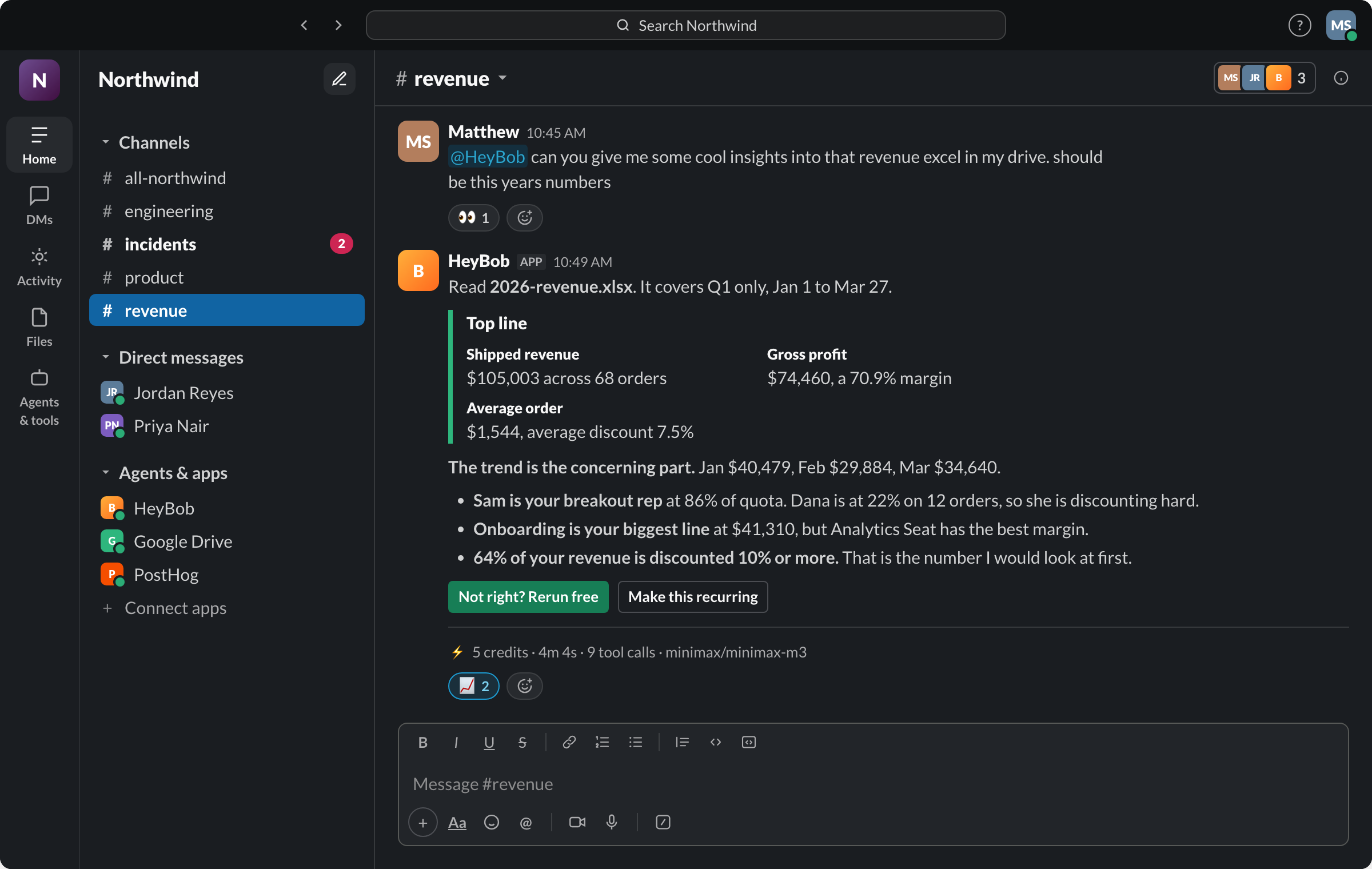
The receipt under the run in the screenshot above, copied verbatim from production. Every finished run gets one. Ask “what ran this week” and Bob adds them up.
An AI coworker for Slack should do more than answer questions. It should take a request from chat, understand the context, complete useful work, and report back with the result.
That is the difference between an AI teammate for Slack and a chatbot with a Slack integration. A chatbot gives you another response to read. A coworker moves the work forward.
If you are evaluating an AI coworker for Slack, focus on five things: whether it finishes tasks, remembers relevant context, works across your connected tools, follows approval controls, and operates where your team already works. Bob combines all five with 3,200+ app connections, person/channel/company memory, schedules plus email and webhook triggers, in-thread approvals, mid-run steering, and a receipt on every completed run. Read the guide to adding an AI search coworker to Slack. The goal isn't more AI conversation. It's less work left on your plate.
What is an AI coworker?
An AI coworker is software that receives a request in chat, understands what needs to happen, uses the right tools, completes the work, and reports back.
A useful test is simple: would a capable colleague do more than draft a response? If the answer is yes, your AI coworker should probably do more too.
A capable coworker might:
- Read a Slack thread to understand the request
- Pull relevant information from connected systems
- Turn that information into a document or deck
- Update a system after receiving approval
- Run a recurring job on schedule
- Ask a clarifying question when the request is ambiguous
- Return the finished work along with a clear record of what happened
The important phrase is finished work. An AI coworker shouldn't stop at "here is a suggested email" when the real task is to prepare, send, log, or route that email. It shouldn't simply explain how to update a system if it's meant to carry out the update.
Not every action should happen automatically, of course. Sensitive changes may need a human review first. But the AI coworker should be capable of doing the work, not just describing it.
AI coworker vs. chatbot: what's the difference?
A chatbot generally responds turn by turn. You ask a question, it gives an answer. You provide another instruction, it responds again.
An AI coworker is built around delegation. It should be able to:
- Understand the broader context of a request
- Handle multiple steps in sequence
- Use connected tools outside the chat window
- Keep track of relevant work
- Ask for approval before sensitive actions
- Return an outcome and a record of the actions taken
The difference is less about how human the interface feels and more about what happens after you send the message. A chatbot might produce a draft project update. An AI coworker gathers the underlying information, prepares the update, and returns the finished version for review. A chatbot might explain how to create a report. An AI coworker pulls the required data, builds the report, and shows you what it did.
For a broader explanation of the category, see what is an AI employee.
This doesn't mean every AI coworker should act independently all the time. Good delegation includes boundaries. The system should know what it can do on its own, what requires approval, and when it needs to ask for help.
The bot trap: why a Slack integration isn't enough
"Works in Slack" sounds useful, but Slack is only the location. It doesn't tell you whether the tool can actually do meaningful work.
A basic Slack bot may:
- Answer when someone mentions it
- Summarize a conversation
- Draft text
- Search a narrow source
- Require repeated prompts for every step
- Forget the context as soon as the conversation changes
Those features can be helpful. They aren't the same as delegation. The common trap is judging an AI coworker by its chat experience rather than its work output. A bot can sound polished while still handing every important step back to the user.
Ask what happens after the initial request. Does the tool keep working? Can it access the systems needed to complete the task? Does it know what's already been done? Does it explain what changed? Can it pause for approval instead of guessing?
A Slack AI coworker should reduce coordination overhead, not create a new kind of coordination overhead where someone has to supervise every click.
Five things to demand before you buy
1. It finishes tasks, not just drafts them
The first requirement is end-to-end execution. Look for a tool that can take a clear assignment and complete the useful parts of the job. Depending on your connected systems and permissions, that may include pulling data, building decks, updating systems, running scheduled jobs, and returning the result in Slack.
The exact tasks will vary by company. The principle doesn't: the AI coworker should be judged by what it completes, not by how many suggestions it generates.
During a trial, avoid prompts that only test writing quality. Give it a task with several steps. Ask it to gather information, transform it, and return something your team can use. A useful evaluation prompt might look like this:
"Review the information in this thread, pull the relevant data from the connected source, prepare the requested deliverable, and tell me what you completed. Ask before making any sensitive changes."
That prompt tests comprehension, tool use, execution, uncertainty handling, and reporting all at once.
2. It remembers your team and past work
A coworker shouldn't make you repeat the same background every time you start a conversation. Ask whether the AI can use relevant context from earlier work, including team roles and responsibilities, ongoing projects, previous decisions, recurring tasks, preferred formats, and the status of work already in progress. Bob remembers across threads while separating person, channel, and company facts; see memory of people and the org.
Memory should be useful, not unlimited or mysterious. Bob shows who taught him each fact and when, lets people list, edit, and delete memory in Slack, and replaces a stale fact when a correction conflicts instead of keeping both. That is a much higher bar than "we have vector search."
The practical test is straightforward: give the AI a task that depends on a decision from last week. Does it find and use the right context, or do you have to rebuild the entire situation from scratch? A tool that remembers everything but can't explain why it used a piece of information may still be hard to trust. Relevant context should improve execution while staying visible enough for people to review.
3. It works across your real tools
Can an AI coworker access tools outside Slack? In a useful implementation, yes. Slack is where the request begins, but it's rarely where the entire job happens. Work often requires information or actions in email, calendars, documents, spreadsheets, project systems, customer systems, and internal databases.
Connected tools matter because most business tasks cross system boundaries. An AI that can only read and write in chat may be great at discussion, but it will struggle to finish operational work. Bob reaches 3,200+ apps, personal tools connect per person, and API, MCP, and browser paths cover the systems that are not in the catalog. Breadth is only valuable when the action you need is supported, so test the exact workflow, but a 3,200-app starting point beats rebuilding the same plumbing for every job.
When comparing products, ask:
- Which tools can it connect to?
- Can it read information, write changes, or both?
- Are permissions inherited from existing systems?
- What happens if a required tool is unavailable?
- Can the AI explain which tools it used?
- Can access be limited by person, team, task, or action?
Don't assume "integrations available" means "every action is supported." Verify the specific tools and actions your team needs before you commit.
4. It includes approvals and an audit trail
Delegation is only useful when it's safe to use. An AI coworker should distinguish between low-risk work and sensitive actions. Reading information, preparing a draft, or organizing a report may be fine to run automatically. Sending an external message, changing a record, or making another consequential write should require approval.
Look for approval requests before sensitive writes, clear descriptions of the proposed action, the ability to approve or reject, permission controls, and a record of completed actions. Bob's cards name the app and action in the thread, offer Approve, Always allow, and Deny, bind standing access to the exact action or automation, and let the team review or revoke grants with /bob grants. "The AI handled it" is not an audit trail. People need to know what was requested, what tools were used, what changed, and whether a person approved the action.
You can learn more about approval workflows and how a solid audit trail should work in practice. An audit trail also makes debugging easier. If a result is wrong, your team should be able to review the work rather than guess what happened inside the system.
5. It lives where your team already works
Adoption has a practical side. If your team spends the day in Slack, an AI teammate for Slack should be available there. That cuts the need to open another application, copy context between tools, explain the request a second time, or track another inbox.
The best interface isn't always the most sophisticated one. It's often the place where the work already starts. That doesn't mean every task has to stay in Slack. The AI may need connected tools to finish the job. But the request, updates, questions, approvals, and result should be easy for the team to follow in one place.
Questions to ask during a trial
A product demo can make almost any AI tool look impressive. A real trial should test delegation, not just conversation.
Can it complete a multi-step task end to end?
Give it a task that requires more than one action, such as gathering information, creating a deliverable, and reporting what it did. Look for whether it understands the objective, chooses sensible steps, uses the necessary connected tools, finishes the deliverable, and reports blockers clearly instead of handing routine steps back to you. If the tool stops after producing instructions, it may be an assistant rather than a coworker.
Does it remember relevant work from last week?
Test continuity with a task that depends on previous context, without giving it every detail again. Check whether it can distinguish relevant information from unrelated conversation. Memory should help the task move faster, not create confusion or expose information to people who shouldn't see it.
What happens when it's unsure?
A trustworthy AI coworker should ask instead of guessing when the stakes are meaningful. Test ambiguous instructions, missing data, conflicting information, and sensitive actions. Notice whether the tool asks a focused question, explains what it needs, and pauses before making a consequential change. Confident guessing is not a productivity feature.
Who can see what it did?
Review the visibility and reporting model. Ask who can see the request, who can see the result, who can see connected data, who receives approval requests, and where the action history is recorded. The answer should be clear before you connect important company systems.
Why we built Bob this way
Bob is an AI employee for Slack, with Microsoft Teams coming soon. You give Bob a task in chat, Bob works across the right connected systems, and Bob returns the finished work plus a receipt. If a task is already running, a follow-up can steer it or interrupt it instead of creating a second disconnected job.
That model is intentionally different from asking a chatbot for suggestions. The assignment is the starting point. The useful outcome is the completed work. Bob can pull data, read attachments and images, build decks and workbooks, update systems, watch an inbox, respond to an email or webhook, run scheduled jobs, and ask for approval before sensitive writes. His memory carries relevant context across threads without mixing one person's preferences into another's work. What Bob can do for your team still depends on the specific actions and permissions you connect, so test the real workflow, not a writing prompt.
The operating model is simple:
- Give Bob the job in Slack, or let a schedule, email, inbox event, or webhook start it.
- Let Bob handle the reads and routine work across the right person's connections.
- Approve only the sensitive writes, when the card appears in the thread.
- Review the finished deliverable and its cost, duration, and tool-call receipt.
Free reruns are part of the deal when Bob misses the mark, and any run that has to stop so you can connect an app is refunded. That gives teams a practical way to test a real workflow rather than judge the product from a scripted demo. Give Bob a genuine Slack task, review the result, and check whether the receipt gives you enough visibility to trust the process.
FAQ
What is an AI coworker?
An AI coworker is software that receives a request, understands the relevant context, uses connected tools, completes useful work, and reports back. Unlike a basic chatbot, it's built for delegation and task execution, not just conversation.
What is the difference between an AI coworker and a chatbot?
A chatbot typically responds to prompts one turn at a time. An AI coworker should handle multi-step tasks, use connected tools, retain relevant context, ask for approval when needed, and return completed work with a record of what it did.
Can an AI coworker access tools outside Slack?
Yes, when the product supports those connections and has the required permissions. This matters because most business tasks involve email, calendars, documents, systems, or data sources beyond chat. Verify the specific tools and actions before buying.
Is it safe to give an AI coworker access to company tools?
It can be, provided the system offers appropriate permissions, approval controls, visibility, and auditability. Start with limited access and lower-risk tasks. Require approval before sensitive writes, and make sure your team can review what the AI accessed and changed before you widen its access.
What should an AI coworker return after completing a task?
It should return the finished work and a clear receipt. The receipt should explain what was completed, which actions were taken, whether any approval was required, and what remains outstanding. A result without visibility is hard to review or trust.
Judge the coworker by completed work
The difference between conversational assistance and safe delegation is what happens after the prompt.
A chatbot gives you another answer. An AI coworker for Slack should take ownership of useful work, use the tools it needs, remember relevant context, ask before sensitive actions, and show what it did.
Before you buy, test the tool with a real multi-step task. Check whether it finishes the work, handles uncertainty responsibly, and returns a useful receipt. Slack is the right home for the interaction, but the real value is what happens beyond the message.
Ready to test the difference? Give Bob a real Slack task and review the finished work and receipt.